
 1 / 4
1 / 4About Bungaku Font
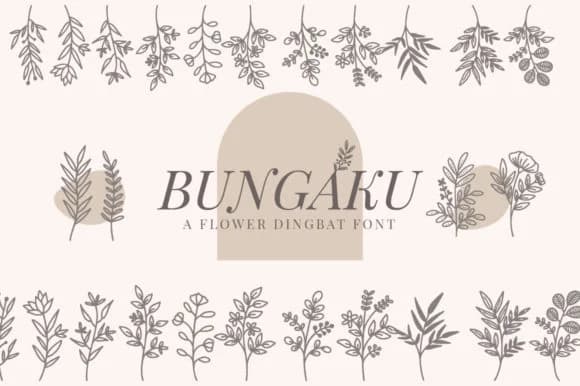
You're laying out an autumn wedding invitation suite, and you need decorative flourishes that feel organic without being overwrought. Bungaku, designed by SiapGraph, is a dingbat font built for exactly this kind of work: a collection of botanical elements that bring personality to layouts without demanding center stage.
The font shines in wedding invitation suites, botanical social media graphics, product packaging labels, and hand-lettered craft signs. Bungaku's floral and leaf characters function as ready-made clipart assets, letting you layer ornamental detail into designs without redrawing custom shapes or hunting for licensed illustrations elsewhere. You get a full roster of seasonal and botanical glyphs that render cleanly at any scale. Place them small around margins and text, or enlarge them to fill space as focal point decorations on a poster or card.
What makes this work is its flexibility. These dingbats function equally well in minimalist layouts or fully ornate compositions, serving mascot design, logo detail work, and botanical embellishment on stationery or product labels with the same grace. The glyphs render crisply at any scale, from delicate small-scale accents to large decorative elements that command attention. You get equally clean results at the minimal end or when ornamentation takes center stage. Grab Bungaku from Creative Fabrica to add these botanical marks to your toolkit.
Style & Use Cases
- Overall Style
- Iconographic, Dingbat
- Use Case
- Icons, Accents
- Ideal For
- ornaments, bullets, and decorative flourishes
- Pairs With
- any text font
How to Install Bungaku Font
Step-by-step instructions for every platform
- 1Download the Bungaku font file (.ttf or .otf).
- 2Locate the downloaded file in your Downloads folder.
- 3Right-click the font file.
- 4Select "Install" to install for the current user, or "Install for all users" to make it available system-wide.
- 5Bungaku is now available in Word, Photoshop, Illustrator, and all other apps.
More by SiapGraph
View all →

Browse fonts by theme
Curated collections →Saw a font in a picture? Identify any font from an image with our free Font Finder.
More Dingbats Fonts
Browse all →







What pairs well with Bungaku Font?
Bungaku Font is a versatile dingbats font that works for both headings and body text. Pair it with a contrasting sans-serif or serif font to add visual interest and a clear distinction between titles and body copy.



Bungaku Font
by SiapGraph
Reviewed by the FontBoxDL team · Updated July 2026