 Firefox
 1 / 5
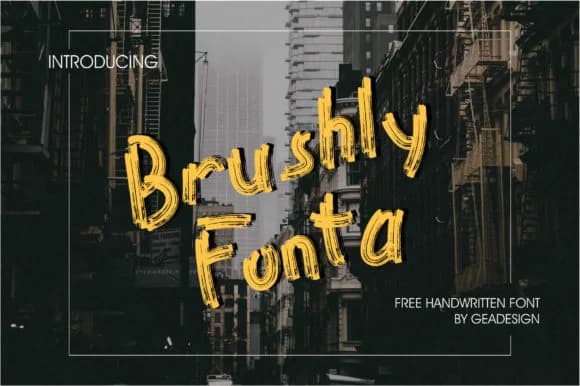
1 / 5About Brushly Fonta Font
Brushly Fonta by geadesign is a contemporary handwritten script with an edgy, street-inspired character. The font captures that raw energy you find in modern urban design, bringing a casual yet intentional feel to anything it touches. It's got the rough confidence of a marker on pavement, but clean enough for professional use where you still need legibility.
This works particularly well for indie record covers, craft brewery labeling, and graffiti-style wall art installations where you want that hand-done aesthetic. If you're designing tattoo lettering, creating urban fashion tags, or building an artist's portfolio, the hand-drawn quality here lends genuine authenticity that pre-made fonts struggle to match. The loose, confident strokes give brand identities and merchandise packaging a distinct personality without feeling overly polished or corporate. You'll also find it useful for book covers targeting younger audiences, street art posters, and contemporary greeting cards where you want visual character without sacrificing readability.
The font strikes a real balance between artistic flair and functional letterforms. It's legible enough for body copy but honestly shines brightest when used as a headline or focal point in your layout. Grab Brushly Fonta on Creative Fabrica and bring that authentic handwritten edge to your next project.
Style & Use Cases
- Overall Style
- Elegant, Flowing, Brushly Fonta
- Use Case
- Invitations, Branding
- Ideal For
- wedding stationery, greeting cards, and signatures
- Pairs With
- a simple uppercase sans
How to Install Brushly Fonta Font Font
Step-by-step instructions for every platform
- 1Download the Brushly Fonta Font font file (.ttf or .otf).
- 2Locate the downloaded file in your Downloads folder.
- 3Right-click the font file.
- 4Select "Install" to install for the current user, or "Install for all users" to make it available system-wide.
- 5Brushly Fonta Font is now available in Word, Photoshop, Illustrator, and all other apps.
More by geadesign
View all →

Browse fonts by theme
Curated collections →Saw a font in a picture? Identify any font from an image with our free Font Finder.
More Script Handwritten Fonts
Browse all →







What pairs well with Brushly Fonta Font?
Brushly Fonta Font is a script font that shines as a display or heading face. Pair it with a clean sans-serif or serif font for body text — the contrast creates a clear hierarchy while the two styles stay balanced and easy to read.



Brushly Fonta Font
by geadesign
Reviewed by the FontBoxDL team · Updated June 2026