 Firefox
 1 / 6
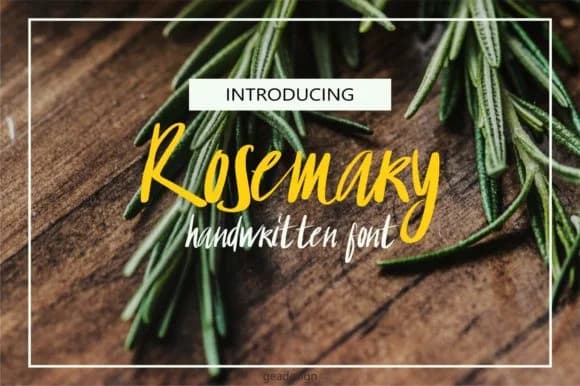
1 / 6About Rosemary Font by geadesign Font
Picture laying out a wedding invitation suite where every detail signals care and craft. That's where Rosemary Font, created by geadesign, steps in with handwritten character that feels genuine and steady. It works beautifully across invitations, place cards, and greeting cards, where authenticity matters. The typeface maintains its legibility even at smaller sizes, making it practical for body text if you need it, not just headlines. Print designers and stationery makers will notice how consistently it reproduces across different materials.
This script opens doors for branding work too. Boutique skincare labels, artisanal food packaging, custom event tags, and hand-lettered menu cards all benefit from that organic touch. You'll find it works well in social media graphics that pair lettered headers with product photography or lifestyle shots. It integrates smoothly with modern sans-serif companions if you're building a cohesive design system.
The typeface comes as a single weight, which keeps its identity clear while remaining versatile for different scales. Legibility holds strong at display sizes, which makes it reliable for signage and larger brand applications. Head to Creative Fabrica to add Rosemary to your fonts and have it ready for projects that call for authentic handwriting without the hours spent actually writing.
Style & Use Cases
- Overall Style
- Elegant, Flowing, Rosemary
- Use Case
- Invitations, Branding
- Ideal For
- wedding stationery, greeting cards, and signatures
- Pairs With
- a simple uppercase sans
How to Install Rosemary Font by geadesign Font
Step-by-step instructions for every platform
- 1Download the Rosemary Font by geadesign font file (.ttf or .otf).
- 2Locate the downloaded file in your Downloads folder.
- 3Right-click the font file.
- 4Select "Install" to install for the current user, or "Install for all users" to make it available system-wide.
- 5Rosemary Font by geadesign is now available in Word, Photoshop, Illustrator, and all other apps.

Browse fonts by theme
Curated collections →Saw a font in a picture? Identify any font from an image with our free Font Finder.
More Script Handwritten Fonts
Browse all →







What pairs well with Rosemary Font by geadesign Font?
Rosemary Font by geadesign Font is a script font that shines as a display or heading face. Pair it with a clean sans-serif or serif font for body text — the contrast creates a clear hierarchy while the two styles stay balanced and easy to read.



Rosemary Font by geadesign Font
by geadesign
Reviewed by the FontBoxDL team · Updated June 2026