 Firefox
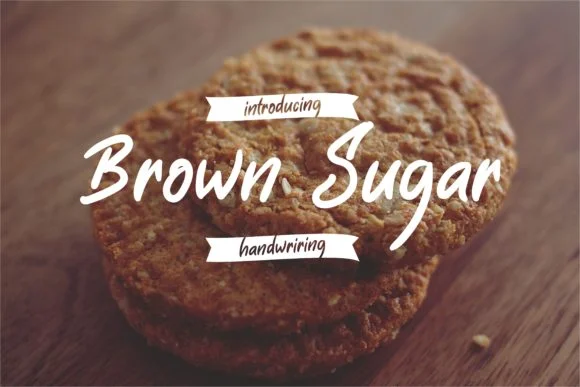 1 / 4
1 / 4About Brown Sugar Font
Brown Sugar, a handwritten script typeface by Fype Co., captures the warmth of hand-drawn lettering with letterforms that feel organic yet controlled. The graceful curves and flowing characters maintain strong readability, distinguishing this font from heavier or more decorative scripts that sacrifice clarity for style. Its contemporary aesthetic bridges casual and polished sensibilities, making it remarkably versatile across different design contexts and brand personalities.
The script shines in wedding invitation suites, where couples want personality without losing elegance or formal appeal. It works equally well for greeting card designs, small-business branding (think boutique coffee shops or creative studios seeking a more human aesthetic), and personalized social media graphics that need authentic character. Product packaging for artisan or handmade goods benefits from the font's approachable yet refined presence. Event posters and announcements also pair nicely with Brown Sugar's balanced proportions, while interior signage and custom name tags offer additional avenues for this script's natural warmth and charm.
This font serves designers and creative professionals who need genuine handwritten character without the unpredictability of actual hand lettering. It's ideal for anyone building a brand that values personality over corporate conformity. Brown Sugar is available on Creative Fabrica for immediate use.
Style & Use Cases
- Overall Style
- Elegant, Flowing, Brown Sugar
- Use Case
- Invitations, Branding
- Ideal For
- wedding stationery, greeting cards, and signatures
- Pairs With
- a simple uppercase sans
How to Install Brown Sugar Font Font
Step-by-step instructions for every platform
- 1Download the Brown Sugar Font font file (.ttf or .otf).
- 2Locate the downloaded file in your Downloads folder.
- 3Right-click the font file.
- 4Select "Install" to install for the current user, or "Install for all users" to make it available system-wide.
- 5Brown Sugar Font is now available in Word, Photoshop, Illustrator, and all other apps.
More by Fype Co.
View all →


Browse fonts by theme
Curated collections →Saw a font in a picture? Identify any font from an image with our free Font Finder.
More Script Handwritten Fonts
Browse all →







What pairs well with Brown Sugar Font?
Brown Sugar Font is a script font that shines as a display or heading face. Pair it with a clean sans-serif or serif font for body text — the contrast creates a clear hierarchy while the two styles stay balanced and easy to read.




Brown Sugar Font
by Fype Co.
Reviewed by the FontBoxDL team · Updated June 2026