
 1 / 8
1 / 8About Britka Font
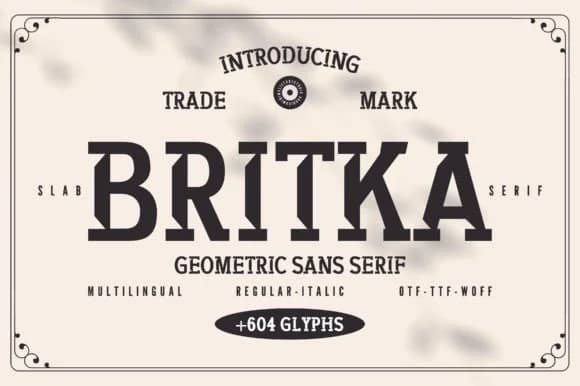
You're designing a vintage butcher shop storefront and need lettering that reads bold and industrial without feeling cold or brittle. Britka, a slab serif from Minimalistartstudio, hits that balance perfectly. The typeface combines geometric sharpness with the weighted strokes of a classic slab, giving it real backbone for commanding headlines while keeping the forms clean and direct. It's sturdy without being crude, structured without feeling sterile or overly modern.
Heritage product labels, craft spirits bottles, artisan jam packaging, and small-batch pickle jars all showcase Britka's substantial character. Rustic hospitality menus, DIY signage projects, antique store branding, and vintage-style poster art benefit from its legible confidence without unnecessary fussiness. Tattoo shop logos and industrial warehouse signage feel at home in this typeface. School and venue posters that need real grit and gravitas also work well here. The sheer weight and geometric structure command attention at large display sizes, where every letter carries unmistakable visual presence.
At any size, the regular weight maintains crisp, sharp letterforms whether you're scaling for maximum impact or tightening for a compact logo. Grab it on Creative Fabrica and start building your next project with a slab serif that truly delivers genuine industrial character.
Style & Use Cases
- Overall Style
- Sturdy, Confident, Slab Font
- Use Case
- Headlines, Merch
- Ideal For
- vintage posters, logos, and product packaging
- Pairs With
- a light sans-serif
How to Install Britka Font
Step-by-step instructions for every platform
- 1Download the Britka font file (.ttf or .otf).
- 2Locate the downloaded file in your Downloads folder.
- 3Right-click the font file.
- 4Select "Install" to install for the current user, or "Install for all users" to make it available system-wide.
- 5Britka is now available in Word, Photoshop, Illustrator, and all other apps.
More by Minimalistartstudio
View all →



Browse fonts by theme
Curated collections →Saw a font in a picture? Identify any font from an image with our free Font Finder.
More Slab Serif Fonts
Browse all →







What pairs well with Britka Font?
Britka Font is a slab serif font that shines as a display or heading face. Pair it with a clean sans-serif or serif font for body text — the contrast creates a clear hierarchy while the two styles stay balanced and easy to read.



Britka Font
Reviewed by the FontBoxDL team · Updated September 2026