 Firefox
 1 / 6
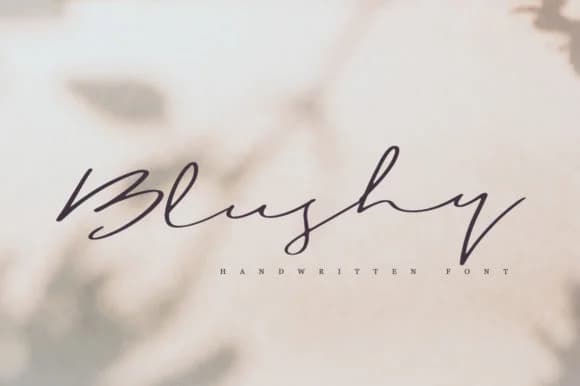
1 / 6About Blushy Font
Imagine you're hand-lettering a wedding invitation by hand, trying to capture that genuine, personal touch that makes something feel crafted rather than corporate. That's exactly the feeling Blushy, designed by Katie Holland, brings to any project without requiring the manual effort. This handwritten script works beautifully for wedding invitation suites, boutique skincare packaging, hand-lettered product labels, and craft merchandise tags. The letterforms feel organic and natural, like they were drawn with genuine intention rather than mechanically generated. There's warmth in how each character sits alongside the others.
What separates a really effective handwritten script from a generic one is personality combined with usability. Blushy manages both through flowing, expressive letterforms that maintain clarity at any size. The consistent baseline and balanced letterweight keep things legible whether you're setting it large for a header or smaller for product labeling. Designers tired of scripts that feel stiff or overly digital will appreciate how this one retains that handmade aesthetic across different applications. The regular weight works smoothly across headlines, body copy, and decorative elements, giving you flexibility without sacrificing the handwritten charm that makes this script valuable.
Find Blushy on Creative Fabrica, where it's ready for download and set to bring authentic character to your designs.
Style & Use Cases
- Overall Style
- Elegant, Flowing, Blushy Regular
- Use Case
- Invitations, Branding
- Ideal For
- wedding stationery, greeting cards, and signatures
- Pairs With
- a simple uppercase sans
How to Install Blushy Font Font
Step-by-step instructions for every platform
- 1Download the Blushy Font font file (.ttf or .otf).
- 2Locate the downloaded file in your Downloads folder.
- 3Right-click the font file.
- 4Select "Install" to install for the current user, or "Install for all users" to make it available system-wide.
- 5Blushy Font is now available in Word, Photoshop, Illustrator, and all other apps.
More by Katie Holland
View all →
Browse fonts by theme
Curated collections →Saw a font in a picture? Identify any font from an image with our free Font Finder.
More Script Handwritten Fonts
Browse all →







What pairs well with Blushy Font?
Blushy Font is a script font that shines as a display or heading face. Pair it with a clean sans-serif or serif font for body text — the contrast creates a clear hierarchy while the two styles stay balanced and easy to read.



Blushy Font
Reviewed by the FontBoxDL team · Updated June 2026