
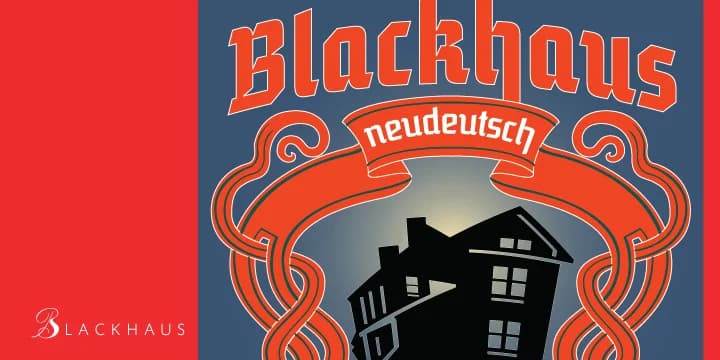
About Blackhaus Font
Blackhaus hits with genuine drama and historical weight from the first letter. This blackletter from Canada Type brings the intricate, hand-drawn quality of medieval manuscripts into contemporary design work.
The font excels in specific, high-impact contexts where its formal character truly matters. Wedding invitation suites gain elegance and gravitas when set in Blackhaus. Vintage certificate designs, historical document reproductions, and antique shop signage all feel authentic and period-appropriate when rendered in its intricate strokes. Band and metal merchandise logos benefit from its dark, commanding presence, while book cover lettering really showcases the typeface's ornate details. Museum exhibit materials and formal event posters for historical reenactments are natural fits too. The thick verticals and elaborate flourishes create substantial visual interest without losing readability at larger sizes. This is a typeface that works because it looks like it was carved by hand, not designed on a screen.
Pair Blackhaus with a simple, light sans-serif for body copy to create breathing room in layouts that need both elegance and clarity. The contrast between its baroque letterforms and a restrained typeface is exactly what sophisticated, complex designs need. Grab Blackhaus from Creative Fabrica and bring genuine historical character and depth to your next project.
Style & Use Cases
- Overall Style
- Ornate, Gothic
- Use Case
- Logos, Certificates
- Ideal For
- medieval themes, band merch, and tattoo lettering
- Pairs With
- a clean sans-serif for body text
How to Install Blackhaus Font
Step-by-step instructions for every platform
- 1Download the Blackhaus font file (.ttf or .otf).
- 2Locate the downloaded file in your Downloads folder.
- 3Right-click the font file.
- 4Select "Install" to install for the current user, or "Install for all users" to make it available system-wide.
- 5Blackhaus is now available in Word, Photoshop, Illustrator, and all other apps.
More by Canada Type
View all →
Browse fonts by theme
Curated collections →Saw a font in a picture? Identify any font from an image with our free Font Finder.
More Blackletter Fonts
Browse all →







What pairs well with Blackhaus Font?
Blackhaus Font is a blackletter font that shines as a display or heading face. Pair it with a clean serif or sans-serif font for body text — the contrast creates a clear hierarchy while the two styles stay balanced and easy to read.



Blackhaus Font
by Canada Type
Reviewed by the FontBoxDL team · Updated June 2026