 Firefox
 1 / 9
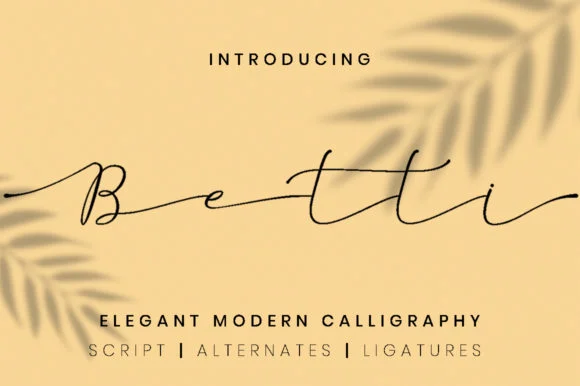
1 / 9About Betti Script Font
Betti Script flows with the natural rhythm of pen strokes, capturing that fluid, spontaneous quality that hand-drawn lettering brings without sacrificing readability. Designed by attypestudio, this contemporary script refuses the stiff precision you'd find in formal calligraphy fonts, instead leaning into organic curves and slightly imperfect letterforms that feel intentional rather than accidental.
The font's real strength lies in its versatility across projects where personal, refined handwriting makes a meaningful difference. Wedding invitation suites gain an immediate intimacy from Betti, as do luxury jewelry websites, boutique cosmetics packaging, and handmade business cards. Betti works equally well for Etsy product listings and high-end stationery. The multiple alternates provide subtle variations within a single word, letting you build layouts with genuine movement rather than the repetitive sameness that generic scripts produce.
Any designer tackling projects that need to feel both contemporary and human-scaled will find this script invaluable. The letterforms carry elegance without pretension, making it a reliable go-to for brands that value handcrafted aesthetics. You'll find Betti Script on Creative Fabrica, ready to bring its warmth and sophistication to your next design.
Style & Use Cases
- Overall Style
- Classic, Refined, Script
- Use Case
- Editorial, Print
- Ideal For
- book covers, long-form text, and traditional branding
- Pairs With
- a clean sans-serif for captions
How to Install Betti Script Font Font
Step-by-step instructions for every platform
- 1Download the Betti Script Font font file (.ttf or .otf).
- 2Locate the downloaded file in your Downloads folder.
- 3Right-click the font file.
- 4Select "Install" to install for the current user, or "Install for all users" to make it available system-wide.
- 5Betti Script Font is now available in Word, Photoshop, Illustrator, and all other apps.
More by attypestudio
View all →

Browse fonts by theme
Curated collections →Saw a font in a picture? Identify any font from an image with our free Font Finder.
More Serif Fonts
Browse all →
What pairs well with Betti Script Font?
Betti Script Font is a versatile serif font that works for both headings and body text. Pair it with a contrasting sans-serif or slab serif font to add visual interest and a clear distinction between titles and body copy.




Betti Script Font
by attypestudio
Reviewed by the FontBoxDL team · Updated August 2026