 Firefox
 1 / 5
1 / 5About Beloid Gothic Font
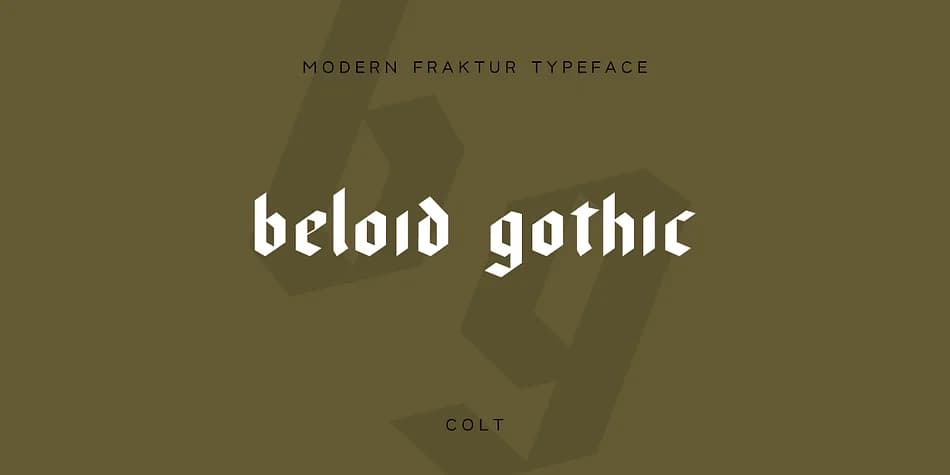
Beloid Gothic presents a striking geometric interpretation of blackletter design, where sharp angles and bold strokes command attention. Developed by wearecolt, this fraktur-influenced typeface draws inspiration from medieval manuscript traditions but strips away ornamentation to reveal pure structural form. The 35-degree angled nib creates dramatic stroke contrast that makes every letterform feel deliberate and weighty, perfect for applications where presence matters.
This is fundamentally a statement font built for headlines, logos, and display work that needs to grab attention immediately. Book cover typography, magazine spread headers, and wine label design all showcase what Beloid Gothic does best. Wedding invitation suites, craft brewery branding, and luxury packaging benefit from its distinctive medieval-modern blend and substantial visual weight. Beyond English, the full European character set means you're equipped for multilingual projects without limitation.
Designers who want blackletter's authority without kitsch will recognize Beloid Gothic's restraint and intentionality. High-end editorial design, bespoke logo work, and heritage brand identity are natural fits for a typeface this confident. From a single impactful word to an entire headline, the geometric precision stays readable while fraktur roots maintain that medieval visual weight. Find Beloid Gothic on Creative Fabrica and anchor your next project with bold historical character.
Style & Use Cases
- Overall Style
- Ornate, Gothic
- Use Case
- Logos, Certificates
- Ideal For
- medieval themes, band merch, and tattoo lettering
- Pairs With
- a clean sans-serif for body text
How to Install Beloid Gothic Font
Step-by-step instructions for every platform
- 1Download the Beloid Gothic font file (.ttf or .otf).
- 2Locate the downloaded file in your Downloads folder.
- 3Right-click the font file.
- 4Select "Install" to install for the current user, or "Install for all users" to make it available system-wide.
- 5Beloid Gothic is now available in Word, Photoshop, Illustrator, and all other apps.
More by wearecolt
View all →



Browse fonts by theme
Curated collections →Saw a font in a picture? Identify any font from an image with our free Font Finder.
More Blackletter Fonts
Browse all →







What pairs well with Beloid Gothic Font?
Beloid Gothic Font is a blackletter font that shines as a display or heading face. Pair it with a clean serif or sans-serif font for body text — the contrast creates a clear hierarchy while the two styles stay balanced and easy to read.



Beloid Gothic Font
by wearecolt
Reviewed by the FontBoxDL team · Updated June 2026