 Firefox
 1 / 4
1 / 4About Armstrong Font
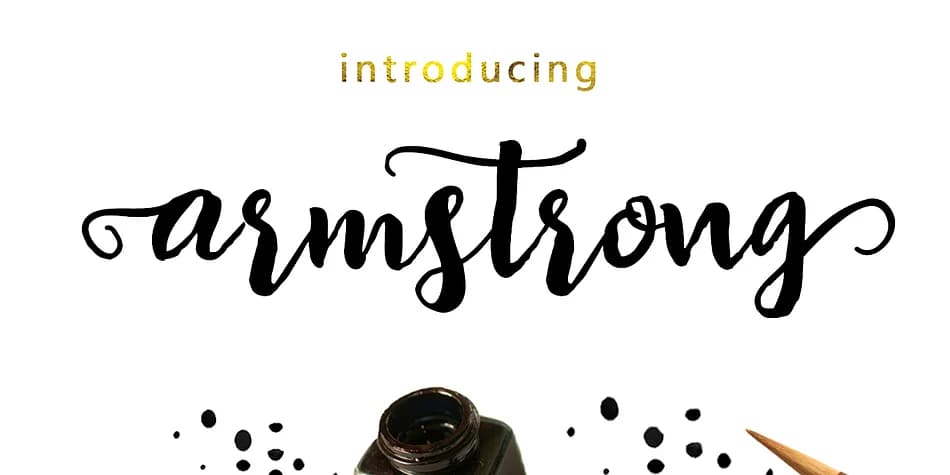
Picture designing a wedding invitation suite that needs personality without looking DIY or amateur. Armstrong, created by Genesislab, is a script that achieves exactly that kind of balance between polish and warmth. This multi-purpose typeface shines on boutique cosmetics packaging, event branding materials, product label design, and logo work, bringing character without demanding all the visual attention in a layout.
The font comes loaded with 256 glyphs and a comprehensive set of alternates accessed through OpenType features, including ligatures, contextual alternates, and swashes. These aren't just decorative options; they let you connect letters fluidly, create custom letter forms, and add flourish exactly where it reads best. Adobe Illustrator, InDesign, and Photoshop all handle the alternates cleanly, as do Microsoft Word and CorelDraw, so you can work in whatever environment suits your workflow best.
Armstrong displays strong legibility at large sizes on signage while remaining crisp and distinctive on smaller product labels. The alternates give you flexibility to customize the look for different projects without switching typefaces. Pick it up on Creative Fabrica and add a working script to your font collection.
Style & Use Cases
- Overall Style
- Elegant, Flowing
- Use Case
- Invitations, Branding
- Ideal For
- wedding stationery, greeting cards, and signatures
- Pairs With
- a simple uppercase sans
How to Install Armstrong Font
Step-by-step instructions for every platform
- 1Download the Armstrong font file (.ttf or .otf).
- 2Locate the downloaded file in your Downloads folder.
- 3Right-click the font file.
- 4Select "Install" to install for the current user, or "Install for all users" to make it available system-wide.
- 5Armstrong is now available in Word, Photoshop, Illustrator, and all other apps.
More by Genesislab
View all →
Browse fonts by theme
Curated collections →Saw a font in a picture? Identify any font from an image with our free Font Finder.
More Script Handwritten Fonts
Browse all →







What pairs well with Armstrong Font?
Armstrong Font is a script font that shines as a display or heading face. Pair it with a clean sans-serif or serif font for body text — the contrast creates a clear hierarchy while the two styles stay balanced and easy to read.



Armstrong Font
by Genesislab
Reviewed by the FontBoxDL team · Updated July 2026