
 1 / 5
1 / 5About Beach Divider Font
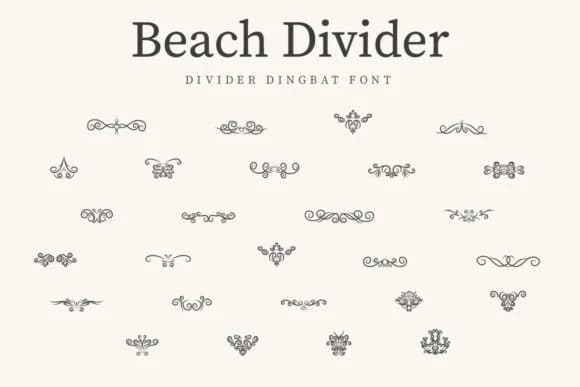
Imagine laying out a destination wedding program or assembling sticker sheets for a coastal-themed craft project. Beach Divider by CraftedType Studio is a dingbat font delivering hand-drawn ornamental dividers and decorative elements with genuine character. The line-work feels organic without appearing clunky or overwrought, making it work equally well framing gift bag tags, adorning scrapbooking layouts, or punctuating event programs with quiet sophistication.
What makes this font effective across so many contexts is its restraint. These ornaments aren't overly busy illustrations demanding center stage; they're thoughtful line elements specifically designed to guide the viewer's eye or separate content without unnecessary fussiness. That functionality means you can use them for wedding favor packaging, personalized greeting card layouts, custom recipe cards, product label design, or even nursery-themed prints without the design feeling cluttered or overwhelming. The hand-drawn quality gives everything a small-batch, artisan feel that contemporary craft work genuinely demands.
Since it's built as a proper dingbat font, every character maps to a different ornament, giving you the flexibility to layer and combine them in unexpected ways. The consistent line weight across all marks ensures they work beautifully together visually. Beach Divider is available on Creative Fabrica and brings exactly what hand-drawn ornamental work should contribute to modern creative projects.
Style & Use Cases
- Overall Style
- Iconographic, Beach Divider Dingbat Font
- Use Case
- Icons, Accents
- Ideal For
- ornaments, bullets, and decorative flourishes
- Pairs With
- any text font
How to Install Beach Divider Font
Step-by-step instructions for every platform
- 1Download the Beach Divider font file (.ttf or .otf).
- 2Locate the downloaded file in your Downloads folder.
- 3Right-click the font file.
- 4Select "Install" to install for the current user, or "Install for all users" to make it available system-wide.
- 5Beach Divider is now available in Word, Photoshop, Illustrator, and all other apps.
More by CraftedType Studio
View all →
Browse fonts by theme
Curated collections →Saw a font in a picture? Identify any font from an image with our free Font Finder.
More Dingbats Fonts
Browse all →







What pairs well with Beach Divider Font?
Beach Divider Font is a versatile dingbats font that works for both headings and body text. Pair it with a contrasting sans-serif or serif font to add visual interest and a clear distinction between titles and body copy.



Beach Divider Font
Reviewed by the FontBoxDL team · Updated July 2026