
 1 / 5
1 / 5About Baby Crown Font
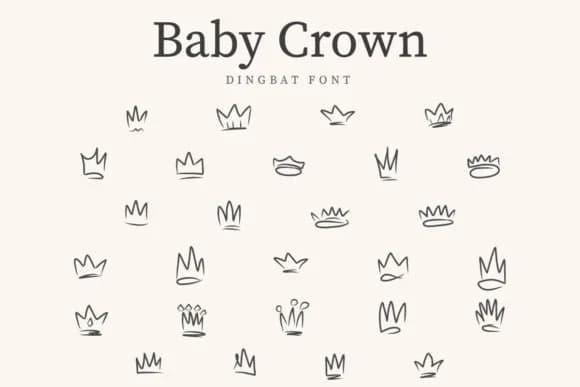
You're working on a baby shower invitation suite and searching for decorative elements that immediately communicate celebration and genuine warmth to everyone who receives them. Baby Crown, a dingbat collection created by CraftedType Studio, delivers everything you need: charmingly illustrated crown shapes and playful doodle ornaments rendered with an authentically hand-drawn quality that feels rare in digital fonts.
Reach for this font when you're building baby shower invitations, children's birthday party favor labels, custom nursery wall decal designs, and baby milestone photo markers meant to commemorate that crucial first year. The hand-drawn character embedded in every shape keeps your work feeling personal and inviting rather than overly polished or mass-manufactured, which is what these specific projects actually require from a font. You'll find multiple crown variations alongside coordinating doodles within the character set, offering genuine flexibility when constructing layered compositions that feel thoughtful and visually well-balanced.
The hand-drawn linework remains sharp and legible at display sizes, making this set particularly strong for print applications where visual clarity and warmth both matter significantly. That intentional quality becomes even more apparent when your finished designs reach the printer. Baby Crown is available on Creative Fabrica, ready for download whenever you want to add something with real character to your font library.
Style & Use Cases
- Overall Style
- Iconographic, Baby Crown Dingbat Font
- Use Case
- Icons, Accents
- Ideal For
- ornaments, bullets, and decorative flourishes
- Pairs With
- any text font
How to Install Baby Crown Font
Step-by-step instructions for every platform
- 1Download the Baby Crown font file (.ttf or .otf).
- 2Locate the downloaded file in your Downloads folder.
- 3Right-click the font file.
- 4Select "Install" to install for the current user, or "Install for all users" to make it available system-wide.
- 5Baby Crown is now available in Word, Photoshop, Illustrator, and all other apps.
More by CraftedType Studio
View all →



Browse fonts by theme
Curated collections →Saw a font in a picture? Identify any font from an image with our free Font Finder.
More Dingbats Fonts
Browse all →







What pairs well with Baby Crown Font?
Baby Crown Font is a versatile dingbats font that works for both headings and body text. Pair it with a contrasting sans-serif or serif font to add visual interest and a clear distinction between titles and body copy.



Baby Crown Font
Reviewed by the FontBoxDL team · Updated July 2026