
 1 / 8
1 / 8About Astra Font
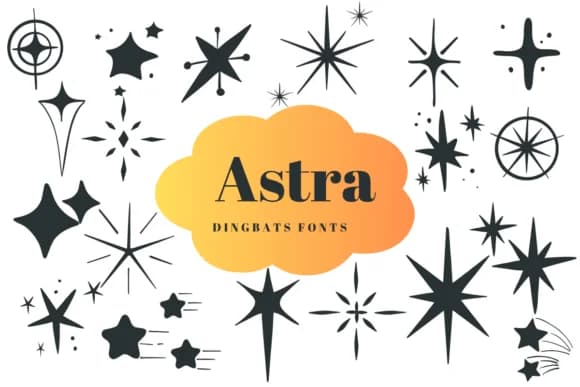
Astra by Suphitchaya is a dingbat collection built around retro stars and cosmic imagery, offering a library of ready-made marks instead of letters. Where other decorative fonts stick to traditional characters, this one trades them entirely for carefully designed celestial symbols and space-age visual elements. You get everything from sharp geometric starbursts to softer, mid-century orbital shapes and shooting-star forms, each optimized for immediate visual impact without needing additional illustration work.
This works beautifully for custom sticker sheets where individual marks need to carry weight on their own, or for vinyl decal designs that benefit from clean, recognizable symbol work. It's equally useful as filler elements on greeting card suites, background patterns on vintage-inspired album artwork, or decorative anchors throughout scrapbooking layouts. The collection's range of styles means you can mix and match variations within a single project without hunting for additional fonts or custom hand-drawn illustrations to fill gaps.
Since it's built for character substitution, it integrates directly into design software without special handling or workarounds. The included styles cover enough ground that most retro space-themed projects will find what they need already present. Grab it from Creative Fabrica and start layering cosmic flair into work that needs a retro space-age personality.
Style & Use Cases
- Overall Style
- Iconographic, Fonts
- Use Case
- Icons, Accents
- Ideal For
- ornaments, bullets, and decorative flourishes
- Pairs With
- any text font
How to Install Astra Font
Step-by-step instructions for every platform
- 1Download the Astra font file (.ttf or .otf).
- 2Locate the downloaded file in your Downloads folder.
- 3Right-click the font file.
- 4Select "Install" to install for the current user, or "Install for all users" to make it available system-wide.
- 5Astra is now available in Word, Photoshop, Illustrator, and all other apps.
More by Suphitchaya
View all →
Browse fonts by theme
Curated collections →Saw a font in a picture? Identify any font from an image with our free Font Finder.
More Dingbats Fonts
Browse all →







What pairs well with Astra Font?
Astra Font is a versatile dingbats font that works for both headings and body text. Pair it with a contrasting sans-serif or serif font to add visual interest and a clear distinction between titles and body copy.



Astra Font
by Suphitchaya
Reviewed by the FontBoxDL team · Updated August 2026