 Firefox
 1 / 9
1 / 9About Artisinal Font
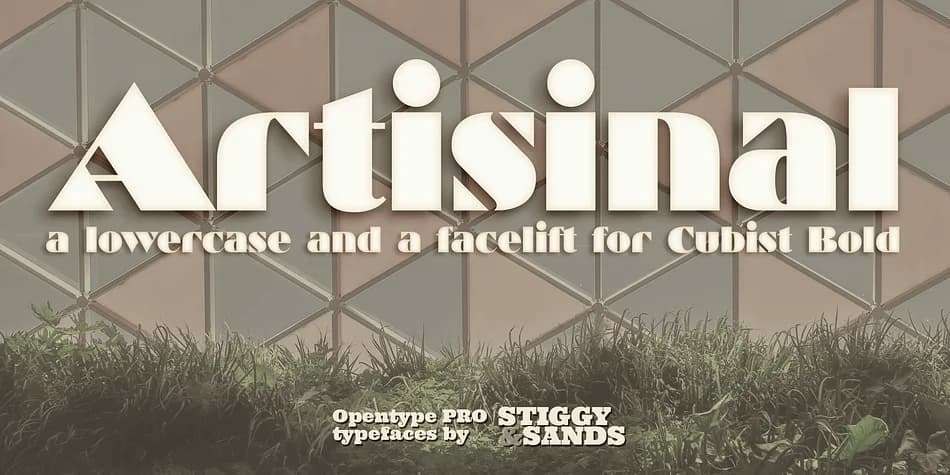
Artisinal captures the geometric grace of 1920s Art Deco letterforms, revived from the original Cubist Bold designed by John W. Zimmerman for Barnhardt Bros. & Spindler in 1929. Stiggy & Sands have thoughtfully expanded this historic typeface, adding a complete lowercase alphabet that sits naturally alongside the original's distinctive wedge serif capitals. The wedge-serif variations are now accessible through contextual alternates, giving you precise control over when that geometric bite appears in your layouts.
What sets this revival apart is its surprising flexibility across different contexts. You get a full sans-serif capital set as the default, with stylistic alternates for characters like lowercase u and y when you want visual variation. With roughly 448 glyphs including comprehensive international language support, plus superiors, inferiors, and f ligatures, there's genuine technical depth for handling fractions, footnotes, and complex typographic work. The typeface shines across upscale vintage branding, wedding invitation suites, luxury cosmetic packaging, and boutique retail labels that demand unmistakable Art Deco character without sacrificing legibility.
This is the font for designers tackling projects that need bold Art Deco personality without losing usability or language reach. Find Artisinal on Creative Fabrica and access a typeface that bridges nearly a century of design evolution.
Style & Use Cases
- Overall Style
- Bold, Distinctive
- Use Case
- Headlines, Posters
- Ideal For
- logos, packaging, and standout titles
- Pairs With
- a neutral sans-serif
How to Install Artisinal Font
Step-by-step instructions for every platform
- 1Download the Artisinal font file (.ttf or .otf).
- 2Locate the downloaded file in your Downloads folder.
- 3Right-click the font file.
- 4Select "Install" to install for the current user, or "Install for all users" to make it available system-wide.
- 5Artisinal is now available in Word, Photoshop, Illustrator, and all other apps.
More by Stiggy & Sands
View all →
Browse fonts by theme
Curated collections →Saw a font in a picture? Identify any font from an image with our free Font Finder.
More Decorative Fonts
Browse all →







What pairs well with Artisinal Font?
Artisinal Font is a decorative font that shines as a display or heading face. Pair it with a clean sans-serif or serif font for body text — the contrast creates a clear hierarchy while the two styles stay balanced and easy to read.



Artisinal Font
Reviewed by the FontBoxDL team · Updated June 2026