
 1 / 8
1 / 8About Arrow Elements Font
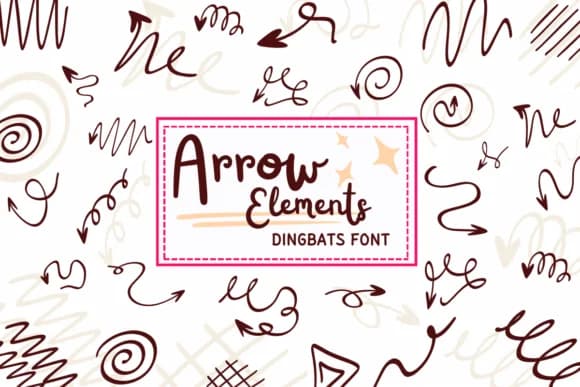
Arrow Elements, from designer PraewDesigns, is a dingbat font built from ornamental, curly arrows with flowing strokes and unmistakable hand-drawn character. What sets it apart is the sketchy, organic feel of each form, where curved lines dominate over rigid geometry, giving your layouts that personal, crafted touch rather than a sterile vector aesthetic. The variety of arrow styles provides real flexibility for different moods and visual contexts.
These arrows excel in valentine card suites where you need directional accents without harsh angles, scrapbooking layouts that benefit from vintage embellishment, hand-lettered wedding invitation designs, and coloring sheets or activity pages aimed at kids. The outline-friendly construction means they work beautifully on line drawings and doodle-style compositions. You can layer multiple arrows to create decorative flourishes, use them individually as section markers, nest them into hand-drawn type, or combine them for that cohesive, DIY aesthetic that feels authentically personal rather than clip-art generic.
This font belongs in the hands of designers tackling playful, nostalgic, or child-focused projects where personality and warmth matter more than precision. The organic nature of these forms makes them particularly well-suited to anything with retro charm, drawn-by-hand energy, or a touch of whimsy. Get Arrow Elements on Creative Fabrica and start building designs with genuine character and a human touch.
Style & Use Cases
- Overall Style
- Iconographic, Arrow Fonts
- Use Case
- Icons, Accents
- Ideal For
- ornaments, bullets, and decorative flourishes
- Pairs With
- any text font
How to Install Arrow Elements Font
Step-by-step instructions for every platform
- 1Download the Arrow Elements font file (.ttf or .otf).
- 2Locate the downloaded file in your Downloads folder.
- 3Right-click the font file.
- 4Select "Install" to install for the current user, or "Install for all users" to make it available system-wide.
- 5Arrow Elements is now available in Word, Photoshop, Illustrator, and all other apps.
More by PraewDesigns
View all →
Browse fonts by theme
Curated collections →Saw a font in a picture? Identify any font from an image with our free Font Finder.
More Dingbats Fonts
Browse all →







What pairs well with Arrow Elements Font?
Arrow Elements Font is a versatile dingbats font that works for both headings and body text. Pair it with a contrasting sans-serif or serif font to add visual interest and a clear distinction between titles and body copy.



Arrow Elements Font
by PraewDesigns
Reviewed by the FontBoxDL team · Updated July 2026