
 1 / 8
1 / 8About Arrow Doodle Font
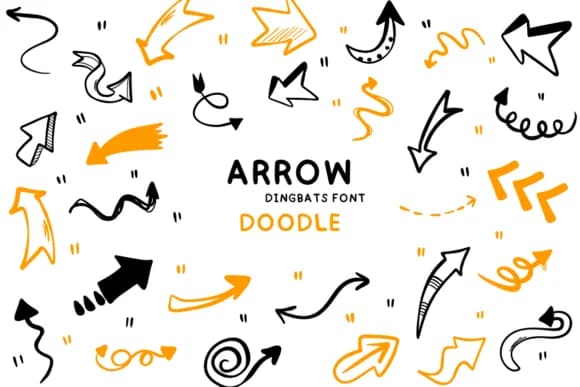
This font radiates a cheerful, hand-sketched energy that instantly brings joy and personality to any project. Arrow Doodle, designed by Bee piyanuch, replaces standard letters with a thoughtful collection of hand-drawn arrow characters, each one brimming with doodle charm and organic movement.
The font shines when you need playfulness baked into the visual design itself. Consider bullet journal spreads with custom direction markers pointing to daily highlights, motivational poster layouts where arrows guide the viewer's eye through your message with genuine character, children's activity books with navigation graphics that feel hand-drawn rather than sterile, or event wayfinding signage that brings personality to what could otherwise be plain directional text. The variety of arrow shapes and styles built into this font means you get multiple directional options to work with, giving you real flexibility without needing to hunt through separate symbol libraries or combine multiple typefaces just to source the right indicator mark.
Pair Arrow Doodle with a calm, geometric sans-serif for body text, which lets the doodle arrows do their visual work without competing for the viewer's attention. You'll find this on Creative Fabrica, ready to bring that hand-crafted movement and direction to designs that truly need personality beyond standard typography.
Style & Use Cases
- Overall Style
- Iconographic, Arrow
- Use Case
- Icons, Accents
- Ideal For
- ornaments, bullets, and decorative flourishes
- Pairs With
- any text font
How to Install Arrow Doodle Font
Step-by-step instructions for every platform
- 1Download the Arrow Doodle font file (.ttf or .otf).
- 2Locate the downloaded file in your Downloads folder.
- 3Right-click the font file.
- 4Select "Install" to install for the current user, or "Install for all users" to make it available system-wide.
- 5Arrow Doodle is now available in Word, Photoshop, Illustrator, and all other apps.
More by Bee piyanuch
View all →
Browse fonts by theme
Curated collections →Saw a font in a picture? Identify any font from an image with our free Font Finder.
More Dingbats Fonts
Browse all →







What pairs well with Arrow Doodle Font?
Arrow Doodle Font is a versatile dingbats font that works for both headings and body text. Pair it with a contrasting sans-serif or serif font to add visual interest and a clear distinction between titles and body copy.



Arrow Doodle Font
by Bee piyanuch
Reviewed by the FontBoxDL team · Updated July 2026