 Firefox
 1 / 8
1 / 8About Arctica Font
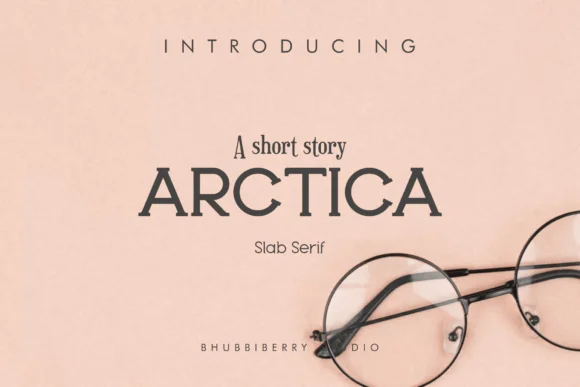
Arctica is a slab serif typeface defined by geometric, chunky letterforms that fully embrace retro aesthetics. Designed by bhubbiberrystudio, it merges the boldness of classic slab serifs with a distinctly vintage sensibility that works equally well in contemporary design. The typeface commands presence through sheer weight rather than decorative excess.
The sturdy line structure and substantial counters suit any project that genuinely needs real visual weight. Vintage concert posters and craft brewery labels shine with its geometric confidence. Book covers drawing from mid-century modern inspiration find exactly what they need here, while leather goods branding appreciates how heritage and craftsmanship sit naturally within these letterforms. Packaging designers reach for typefaces with this kind of presence because they command shelf space without reading as clumsy or overwrought. Social media graphics gain immediate solidity from Arctica, particularly for brands that lean into artisanal values or heritage storytelling. Type choices this substantial reshape how layouts read and how quickly they land.
This typeface serves designers who value substance over novelty. Use it for identity systems, retail packaging, magazine spreads, and custom shop signage; it delivers visual authority that reads as intentional craft at any scale. Find Arctica on Creative Fabrica and add it to your working collection.
Style & Use Cases
- Overall Style
- Sturdy, Confident
- Use Case
- Headlines, Merch
- Ideal For
- vintage posters, logos, and product packaging
- Pairs With
- a light sans-serif
How to Install Arctica Font
Step-by-step instructions for every platform
- 1Download the Arctica font file (.ttf or .otf).
- 2Locate the downloaded file in your Downloads folder.
- 3Right-click the font file.
- 4Select "Install" to install for the current user, or "Install for all users" to make it available system-wide.
- 5Arctica is now available in Word, Photoshop, Illustrator, and all other apps.
More by bhubbiberrystudio
View all →
Browse fonts by theme
Curated collections →Saw a font in a picture? Identify any font from an image with our free Font Finder.
More Slab Serif Fonts
Browse all →







What pairs well with Arctica Font?
Arctica Font is a slab serif font that shines as a display or heading face. Pair it with a clean sans-serif or serif font for body text — the contrast creates a clear hierarchy while the two styles stay balanced and easy to read.




Arctica Font
Reviewed by the FontBoxDL team · Updated August 2026