 Firefox
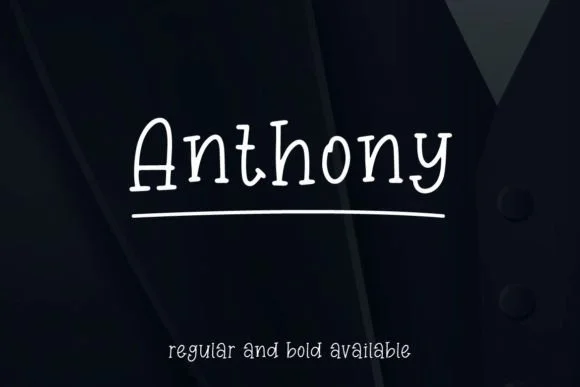 1 / 6
1 / 6About Anthony Font
Anthony commands quiet confidence. Created by Mightyfire, Anthony is a geometric slab-serif that strips away unnecessary noise to reveal pure typographic form, pairing a thin weight with subtle chalk-like texture. The combination feels both contemporary and approachable, making it an unexpected but natural choice for designers seeking restraint without visual compromise.
The font thrives in display contexts where its geometric precision can truly breathe and dominate the page. Use it for modern wedding invitation suites where restraint speaks louder than ornament, high-end skincare packaging that needs sophistication without unnecessary flourish, editorial mastheads in design-forward publications, or artist portfolios showcasing work alongside carefully considered typography. Its minimalist structure also translates beautifully to book covers that embrace hand-lettered character, or as a strong headline treatment positioned above flowing body text in magazine spreads and feature articles.
The thin proportions really sing at display sizes, where every line extension and geometric curve becomes part of the larger visual conversation. Pair Anthony with a light, neutral sans-serif for body passages, letting Anthony command the full visual hierarchy in headlines and display contexts. You'll find it on Creative Fabrica, ready to bring geometric clarity and quiet confidence to your next design system or branding project.
Style & Use Cases
- Overall Style
- Sturdy, Confident, Simple Font
- Use Case
- Headlines, Merch
- Ideal For
- vintage posters, logos, and product packaging
- Pairs With
- a light sans-serif
How to Install Anthony Font
Step-by-step instructions for every platform
- 1Download the Anthony font file (.ttf or .otf).
- 2Locate the downloaded file in your Downloads folder.
- 3Right-click the font file.
- 4Select "Install" to install for the current user, or "Install for all users" to make it available system-wide.
- 5Anthony is now available in Word, Photoshop, Illustrator, and all other apps.
More by Mightyfire
View all →
Browse fonts by theme
Curated collections →Saw a font in a picture? Identify any font from an image with our free Font Finder.
More Slab Serif Fonts
Browse all →







What pairs well with Anthony Font?
Anthony Font is a slab serif font that shines as a display or heading face. Pair it with a clean sans-serif or serif font for body text — the contrast creates a clear hierarchy while the two styles stay balanced and easy to read.




Anthony Font
by Mightyfire
Reviewed by the FontBoxDL team · Updated September 2026