 Firefox
 1 / 9
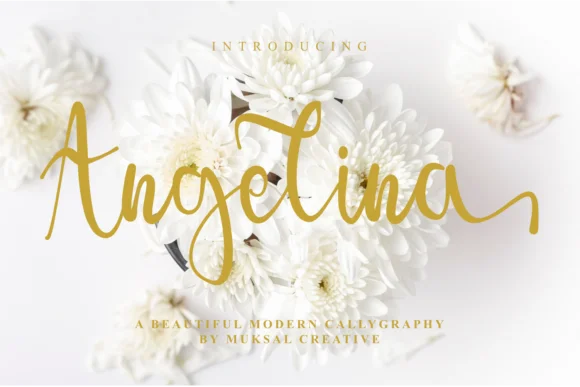
1 / 9About Angelina Font by Muksal Creative Font
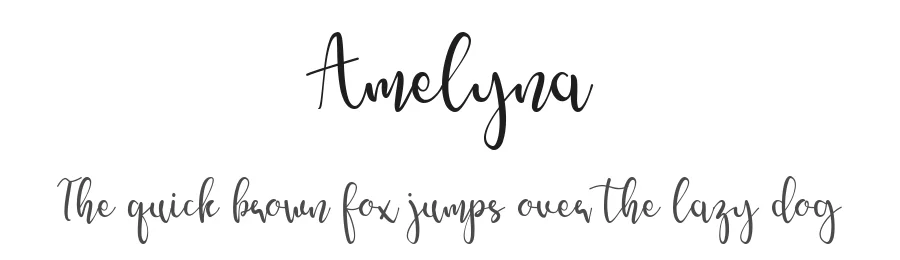
This script brings instant energy and warmth to the page. Angelina Font by Muksal Creative strikes that rare balance between bold confidence and playful ease, the kind that makes viewers actually stop scrolling and take notice.
Its contemporary style works beautifully across a range of design applications. Custom wedding stationery is an obvious choice where you want personality alongside elegance, but so are Etsy shop banners that actually stand out from the grid, artisanal product labels for small batch goods, hand-lettered greeting cards, boutique packaging for skincare or coffee brands, and small restaurant or cafe signage where setting the right mood matters. What sets Angelina apart is the genuine character in the letterforms without veering into gimmicky territory, so the design reads as intentional rather than trendy. You get bold weight that commands real attention on headlines and hero elements while staying readable even at smaller sizes, which makes it remarkably versatile across different project types and scales.
Pair this with a clean, geometric sans-serif for your body text and supporting copy, which creates natural visual hierarchy and lets Angelina do the heavy lifting where it counts most. The contrast between Angelina's expressive personality and a restrained companion font is where the real magic happens in good design. You can grab this from Creative Fabrica and start using it on real client work or personal projects right away.
Style & Use Cases
- Overall Style
- Elegant, Flowing, Angelina
- Use Case
- Invitations, Branding
- Ideal For
- wedding stationery, greeting cards, and signatures
- Pairs With
- a simple uppercase sans
How to Install Angelina Font by Muksal Creative Font
Step-by-step instructions for every platform
- 1Download the Angelina Font by Muksal Creative font file (.ttf or .otf).
- 2Locate the downloaded file in your Downloads folder.
- 3Right-click the font file.
- 4Select "Install" to install for the current user, or "Install for all users" to make it available system-wide.
- 5Angelina Font by Muksal Creative is now available in Word, Photoshop, Illustrator, and all other apps.
More by Muksal Creative
View all →
Browse fonts by theme
Curated collections →Saw a font in a picture? Identify any font from an image with our free Font Finder.
More Script Handwritten Fonts
Browse all →







What pairs well with Angelina Font by Muksal Creative Font?
Angelina Font by Muksal Creative Font is a script font that shines as a display or heading face. Pair it with a clean sans-serif or serif font for body text — the contrast creates a clear hierarchy while the two styles stay balanced and easy to read.




Angelina Font by Muksal Creative Font
Reviewed by the FontBoxDL team · Updated August 2026