 Firefox
 1 / 9
1 / 9About Anadya Font
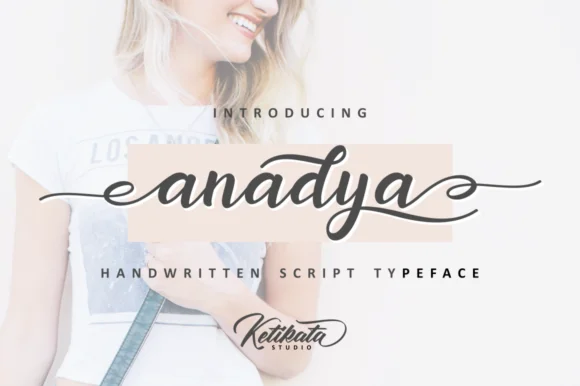
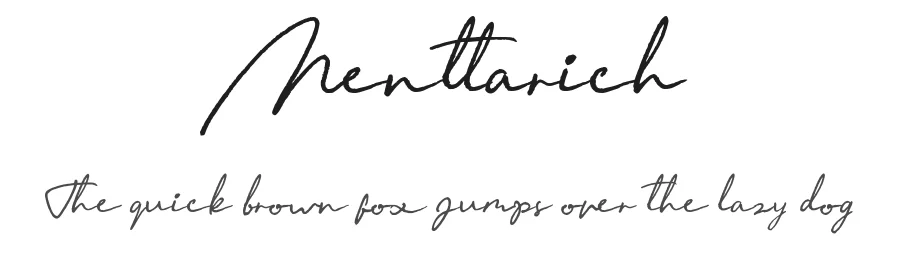
Picture yourself designing wedding invitation suites where flowing script catches the light on textured cardstock. That's where Anadya Font, crafted by Ketikata Studio, truly shines. This script-handwritten typeface carries the ease of a confident hand, with expressive letterforms that feel at home on luxury stationery, cosmetic packaging, and upscale brand identity systems. The swashes give it presence without overwhelming the composition.
Swashes are what make this font memorable. They move with natural rhythm, adding flourish without tipping into ornament overload. Boutique skincare labels come alive with its refined curves, while DIY greeting cards and event announcements gain genuine presence and polish. Etsy product photographers know that picking the right font can shift a listing from amateur to professional grade instantly. At larger display sizes especially, it reads with personality while staying clear, which is exactly what you need when creating headlines or signage.
Having Anadya Font in your toolkit means owning a script that holds its own across different scales and contexts without ever losing its distinctive voice. It's the kind of typeface you reach for when you want something that feels both intentional and approachable. Find it on Creative Fabrica and start adding real warmth to your next project.
Style & Use Cases
- Overall Style
- Elegant, Flowing, Anadya
- Use Case
- Invitations, Branding
- Ideal For
- wedding stationery, greeting cards, and signatures
- Pairs With
- a simple uppercase sans
How to Install Anadya Font Font
Step-by-step instructions for every platform
- 1Download the Anadya Font font file (.ttf or .otf).
- 2Locate the downloaded file in your Downloads folder.
- 3Right-click the font file.
- 4Select "Install" to install for the current user, or "Install for all users" to make it available system-wide.
- 5Anadya Font is now available in Word, Photoshop, Illustrator, and all other apps.
More by Ketikata Studio
View all →
Browse fonts by theme
Curated collections →Saw a font in a picture? Identify any font from an image with our free Font Finder.
More Script Handwritten Fonts
Browse all →







What pairs well with Anadya Font?
Anadya Font is a script font that shines as a display or heading face. Pair it with a clean sans-serif or serif font for body text — the contrast creates a clear hierarchy while the two styles stay balanced and easy to read.




Anadya Font
Reviewed by the FontBoxDL team · Updated June 2026