 Firefox
 1 / 7
1 / 7About Alianza Script Font
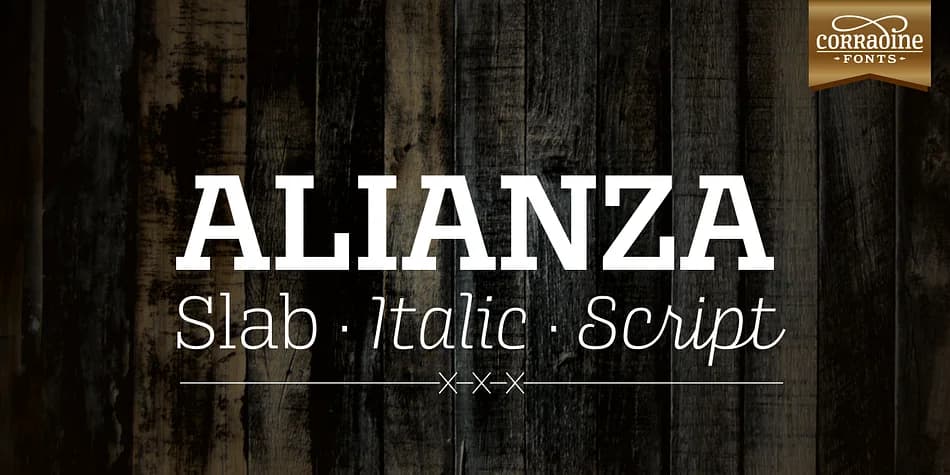
You're developing a brand identity for artisan chocolates, and you want the script on your packaging to feel cohesive with your slab serif headline and supporting italic text. Alianza Script by Corradine Fonts functions as something more than just a standalone typeface: it's the handwritten anchor in a complete three-style system designed to work together in concert.
Built for wedding invitation suites, luxury product labels, event menu cards, and retail branding that demands real typographic consistency, Alianza Script partners directly with Alianza Slab and Alianza Italic. The entire collection ships with nine weights per style, giving you genuine flexibility in hierarchy and visual emphasis. Three sets of ornamental fonts (labels, negative labels, and ornaments) let you layer decorative elements that feel custom rather than templated, while three figure variations (proportional lining, tabular lining, and old style numerals) ensure your pricing, dates, and quantities display correctly at any scale.
Layer the script, slab, and italic within a single composition to push expressiveness without sacrificing visual harmony. Everything feels intentional because proportions and x-height relationships were deliberately calibrated across the entire family. Grab it on Creative Fabrica and explore how a system this thoughtfully constructed can accelerate your design work.
Style & Use Cases
- Overall Style
- Elegant, Flowing
- Use Case
- Invitations, Branding
- Ideal For
- wedding stationery, greeting cards, and signatures
- Pairs With
- a simple uppercase sans
How to Install Alianza Script Font
Step-by-step instructions for every platform
- 1Download the Alianza Script font file (.ttf or .otf).
- 2Locate the downloaded file in your Downloads folder.
- 3Right-click the font file.
- 4Select "Install" to install for the current user, or "Install for all users" to make it available system-wide.
- 5Alianza Script is now available in Word, Photoshop, Illustrator, and all other apps.
More by Corradine Fonts
View all →
Browse fonts by theme
Curated collections →Saw a font in a picture? Identify any font from an image with our free Font Finder.
More Script Handwritten Fonts
Browse all →







What pairs well with Alianza Script Font?
Alianza Script Font is a script font that shines as a display or heading face. Pair it with a clean sans-serif or serif font for body text — the contrast creates a clear hierarchy while the two styles stay balanced and easy to read.



Alianza Script Font
Reviewed by the FontBoxDL team · Updated July 2026