
 1 / 5
1 / 5About After Lock Font
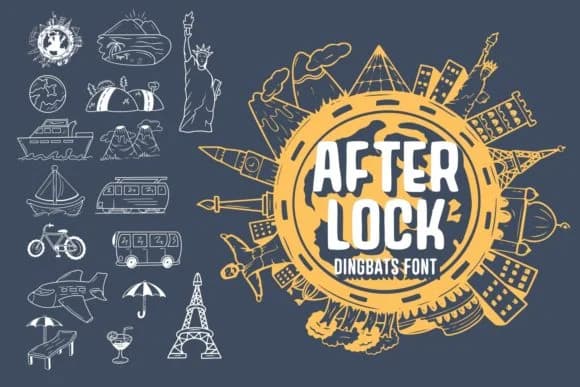
After Lock by Dito (7NTypes) is a dingbats font built from hand-drawn ornaments and decorative characters that feel authentically sketched rather than digitally sterile. The letterforms carry a distinctive doodle quality, giving any project a casual, personal warmth that's difficult to achieve with generic symbol sets. Unlike purely geometric dingbats, these have the loose confidence of something drawn by hand, with slight imperfections that read as intentional rather than sloppy.
This font shines on greeting card suites where personality matters more than strict legibility, and on vintage-inspired labels for handmade goods and boutique skincare packaging. T-shirt graphics, logotypes with a playful edge, event invitations with a craft aesthetic, and magazine cover accents all benefit from the character these ornaments bring. Even book designs and poster work stand out more when decorated with the right dingbat elements. The collection provides enough variety to punctuate layouts without overwhelming them, letting designers layer in just the right visual personality.
Best suited for makers, designers, and small brands who want their output to feel less corporate and more human, After Lock pairs effectively with solid typefaces and plenty of whitespace. Pick it up on Creative Fabrica and start using these charming dingbats right away.
Style & Use Cases
- Overall Style
- Iconographic, Doodles
- Use Case
- Icons, Accents
- Ideal For
- ornaments, bullets, and decorative flourishes
- Pairs With
- any text font
How to Install After Lock Font
Step-by-step instructions for every platform
- 1Download the After Lock font file (.ttf or .otf).
- 2Locate the downloaded file in your Downloads folder.
- 3Right-click the font file.
- 4Select "Install" to install for the current user, or "Install for all users" to make it available system-wide.
- 5After Lock is now available in Word, Photoshop, Illustrator, and all other apps.
More by Dito (7NTypes)
View all →
Browse fonts by theme
Curated collections →Saw a font in a picture? Identify any font from an image with our free Font Finder.
More Dingbats Fonts
Browse all →







What pairs well with After Lock Font?
After Lock Font is a versatile dingbats font that works for both headings and body text. Pair it with a contrasting sans-serif or serif font to add visual interest and a clear distinction between titles and body copy.



After Lock Font
Reviewed by the FontBoxDL team · Updated July 2026