
 1 / 8
1 / 8About Adora Font
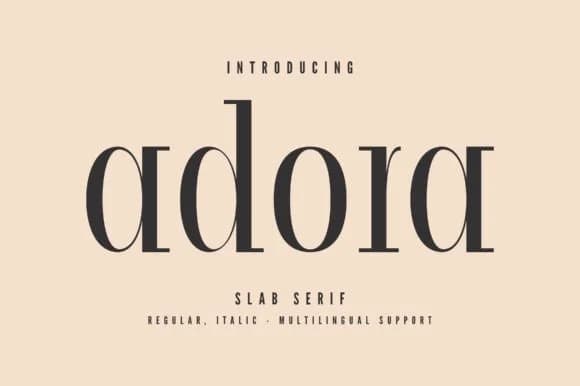
Adora catches attention through chunky, geometric serifs combined with clean, minimal letterforms that feel grounded and deliberate. Designed by Minimalistartstudio, this slab serif delivers authentic 1970s energy without veering into parody, balancing retro sensibility with the visual restraint that modern brands genuinely benefit from.
The typeface builds authority through structural confidence and weight. Bold horizontal serifs and straightforward letterforms cut through busy layouts with clarity and presence, making it ideal for luxury cosmetics packaging, vintage restaurant branding, craft brewery labels, and boutique hospitality identities where visual authority matters. Multiple weights give you genuine flexibility to establish hierarchy and emphasis across your entire design system, useful for packaging suites, brand guidelines, editorial layouts, and environmental graphics.
Adora resonates most with designers and brand makers seeking something that reads authentically modern and nostalgic at once, without hedging between the two. Restaurants built on heritage positioning, independent bookstores crafting timeless visual identities, and hospitality teams that lead with substance rather than trend will find real alignment. It's the kind of typeface built to age well because it wasn't pursuing something temporary or fashionable. Available on Creative Fabrica with all weights included.
Style & Use Cases
- Overall Style
- Sturdy, Confident, 70s
- Use Case
- Headlines, Merch
- Ideal For
- vintage posters, logos, and product packaging
- Pairs With
- a light sans-serif
How to Install Adora Font
Step-by-step instructions for every platform
- 1Download the Adora font file (.ttf or .otf).
- 2Locate the downloaded file in your Downloads folder.
- 3Right-click the font file.
- 4Select "Install" to install for the current user, or "Install for all users" to make it available system-wide.
- 5Adora is now available in Word, Photoshop, Illustrator, and all other apps.
More by Minimalistartstudio
View all →



Browse fonts by theme
Curated collections →Saw a font in a picture? Identify any font from an image with our free Font Finder.
More Slab Serif Fonts
Browse all →







What pairs well with Adora Font?
Adora Font is a slab serif font that shines as a display or heading face. Pair it with a clean sans-serif or serif font for body text — the contrast creates a clear hierarchy while the two styles stay balanced and easy to read.



Adora Font
Reviewed by the FontBoxDL team · Updated September 2026