
 1 / 8
1 / 8About 212 US Dings Font
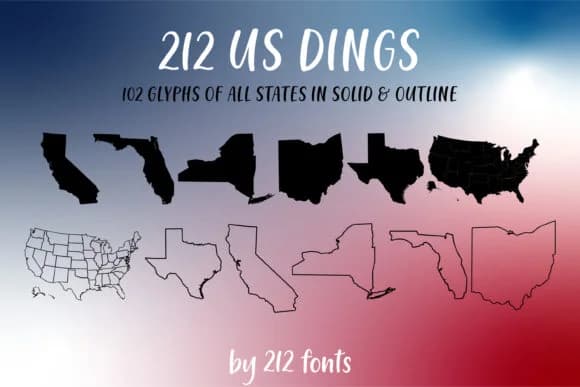
212 US Dings by 212 Fonts is a dingbat collection capturing all 50 American states as distinctive outline and solid shapes. The font contains 102 glyphs total, with each state rendered in both fill and outline form, giving designers genuine flexibility in how they apply regional symbols to their work. The dual-form approach matters because outline versions layer cleanly over backgrounds while solid fills command attention on their own, making it simple to adapt the same state across different visual contexts.
State-focused map graphics benefit immediately from this approach, as do patriotic badge designs, postcard collections celebrating American destinations, and educational infographics about regional topics. Etsy shop owners find these shapes useful for state pride merchandise and travel-themed packaging. Crafters working with cutting machines can trace individual state silhouettes directly, and graphic designers building custom state-identification systems gain two visual treatments from a single font file. The outlined forms especially shine when you need to show state boundaries or create layered composition effects.
This font is particularly suited for designers and educators who work regularly with American geography themes, regional identity projects, or need reliable state iconography in their designs. Grab it on Creative Fabrica to add this asset to your design toolkit.
Style & Use Cases
- Overall Style
- Iconographic, Dingbats
- Use Case
- Icons, Accents
- Ideal For
- ornaments, bullets, and decorative flourishes
- Pairs With
- any text font
How to Install 212 US Dings Font
Step-by-step instructions for every platform
- 1Download the 212 US Dings font file (.ttf or .otf).
- 2Locate the downloaded file in your Downloads folder.
- 3Right-click the font file.
- 4Select "Install" to install for the current user, or "Install for all users" to make it available system-wide.
- 5212 US Dings is now available in Word, Photoshop, Illustrator, and all other apps.
Browse fonts by theme
Curated collections →Saw a font in a picture? Identify any font from an image with our free Font Finder.
More Dingbats Fonts
Browse all →







What pairs well with 212 US Dings Font?
212 US Dings Font is a versatile dingbats font that works for both headings and body text. Pair it with a contrasting sans-serif or serif font to add visual interest and a clear distinction between titles and body copy.



212 US Dings Font
by 212 Fonts
Reviewed by the FontBoxDL team · Updated June 2026