
 1 / 7
1 / 7About Zimple Font
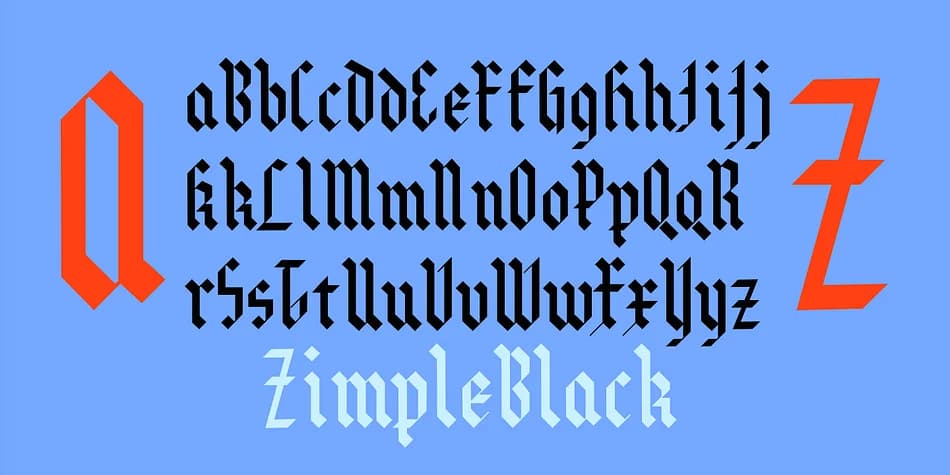
You're designing a medieval tavern menu, and you need lettering that feels authentically gothic without being precious or overdone. Zimple by Ingrimayne Type delivers exactly that: a clean, angular blackletter that trades curves for stark, geometric lines. The simplicity is its genuine strength, cutting through the noise of ornate typefaces while maintaining that unmistakable medieval character. This makes it ideal for gothic wedding invitations, vintage poster lettering, tattoo reference designs, and costume event signage.
The real power here is the layering system built into the font family. Zimple comes with multiple versions: the base font, plus Zimple Shadow and Zimple Extrude Overlay options that stack together for bicolored lettering effects. When you layer these fonts, you get dimensional band logos, book cover titles, and display work that has real visual presence without needing separate design tools or manual construction work. The geometric construction keeps things straightforward.
The spaced design of Zimple Extrude Overlay is deliberate, allowing you to achieve proper registration when building those layered combinations. For standalone use, the angular geometry reads crisply at large sizes on signage and display work. If you want gothic impact with minimal complexity, grab Zimple from Creative Fabrica and experiment with both the layering possibilities and the straightforward single-layer applications.
Style & Use Cases
- Overall Style
- Ornate, Gothic
- Use Case
- Logos, Certificates
- Ideal For
- medieval themes, band merch, and tattoo lettering
- Pairs With
- a clean sans-serif for body text
How to Install Zimple Font
Step-by-step instructions for every platform
- 1Download the Zimple font file (.ttf or .otf).
- 2Locate the downloaded file in your Downloads folder.
- 3Right-click the font file.
- 4Select "Install" to install for the current user, or "Install for all users" to make it available system-wide.
- 5Zimple is now available in Word, Photoshop, Illustrator, and all other apps.
More by Ingrimayne Type
View all →

Browse fonts by theme
Curated collections →Saw a font in a picture? Identify any font from an image with our free Font Finder.
More Blackletter Fonts
Browse all →







What pairs well with Zimple Font?
Zimple Font is a blackletter font that shines as a display or heading face. Pair it with a clean serif or sans-serif font for body text — the contrast creates a clear hierarchy while the two styles stay balanced and easy to read.



Zimple Font
Reviewed by the FontBoxDL team · Updated June 2026