 Firefox
 1 / 9
1 / 9About Zhafran Font
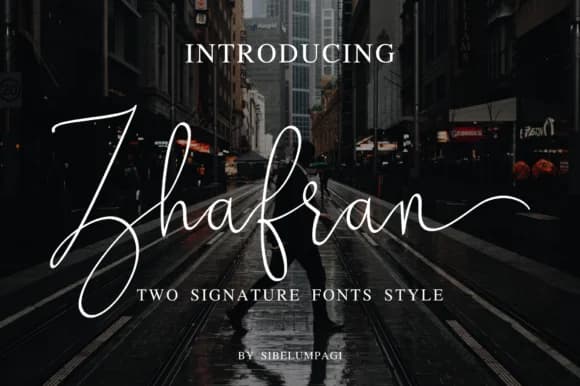
Picture a designer at their desk, sketching out a luxury brand identity that needs to feel both polished and personally crafted. That's where Zhafran Font by Sibelumpagi Studio shines as a signature script with genuine elegance and flowing character. This handwritten-style font delivers for high-end logo work, wedding invitation suites, boutique product packaging, restaurant menu design, and anywhere you need a personal touch without sacrificing sophistication.
The script's refined letterforms and flowing line quality read clearly even at larger sizes while retaining grace when layered as a photo overlay or watermark. Its consistent stroke weight makes it work equally well as a primary design element or a subtle accent line. You'll find it handles stationery sets for creative studios, custom labels for artisanal goods, text framing on social media graphics, and personalized product tags that make buyers actually stop and notice the care taken.
Clean letterforms pair with that signature-ready appearance, adapting smoothly across print and digital applications without losing character or presence. The font carries the weight of careful handwork while staying functional, neither cramped nor overly ornamental. Grab Zhafran Font on Creative Fabrica and add this handwritten sophistication to your design toolkit.
Style & Use Cases
- Overall Style
- Elegant, Flowing, Zhafran
- Use Case
- Invitations, Branding
- Ideal For
- wedding stationery, greeting cards, and signatures
- Pairs With
- a simple uppercase sans
How to Install Zhafran Font Font
Step-by-step instructions for every platform
- 1Download the Zhafran Font font file (.ttf or .otf).
- 2Locate the downloaded file in your Downloads folder.
- 3Right-click the font file.
- 4Select "Install" to install for the current user, or "Install for all users" to make it available system-wide.
- 5Zhafran Font is now available in Word, Photoshop, Illustrator, and all other apps.
More by Sibelumpagi Studio
View all →
Browse fonts by theme
Curated collections →Saw a font in a picture? Identify any font from an image with our free Font Finder.
More Script Handwritten Fonts
Browse all →







What pairs well with Zhafran Font?
Zhafran Font is a script font that shines as a display or heading face. Pair it with a clean sans-serif or serif font for body text — the contrast creates a clear hierarchy while the two styles stay balanced and easy to read.



Zhafran Font
Reviewed by the FontBoxDL team · Updated May 2026