 Firefox
 1 / 7
1 / 7About Yesterday Font
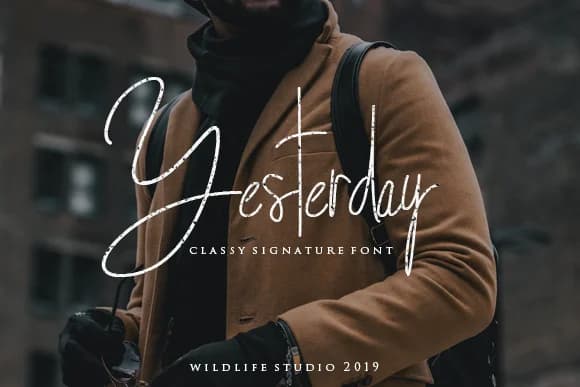
Yesterday by wildlifestudio19 is a clean monoline script that pairs understated elegance with genuine friendliness. Built as a single-stroke design, it sits comfortably between formal and casual, making it work equally well as a bold headline or a refined signature element without overshadowing the message beneath. The contemporary feel comes from restraint, not from trying too hard to impress.
This font is particularly valuable for wedding save-the-dates, minimalist beauty and skincare packaging labels, personal creative portfolios and brand identities, and contemporary event stationery where refinement matters but pretension doesn't fit. The letterforms maintain a balance between casual warmth and controlled precision, reading as approachable while staying polished. Every character carries consistent stroke weight, which means the font performs reliably at any scale and holds its distinctive personality whether you're setting a prominent headline or deploying it as a delicate accent throughout a design. That consistency is what creates the purposeful, modern aesthetic that genuinely feels current rather than forced. You'll appreciate how the design gets out of the way and lets your content carry the actual message.
Grab Yesterday on Creative Fabrica and bring this understated elegance to your next project.
Style & Use Cases
- Overall Style
- Elegant, Flowing, Yesterday
- Use Case
- Invitations, Branding
- Ideal For
- wedding stationery, greeting cards, and signatures
- Pairs With
- a simple uppercase sans
How to Install Yesterday Font Font
Step-by-step instructions for every platform
- 1Download the Yesterday Font font file (.ttf or .otf).
- 2Locate the downloaded file in your Downloads folder.
- 3Right-click the font file.
- 4Select "Install" to install for the current user, or "Install for all users" to make it available system-wide.
- 5Yesterday Font is now available in Word, Photoshop, Illustrator, and all other apps.
More by wildlifestudio19
View all →
Browse fonts by theme
Curated collections →Saw a font in a picture? Identify any font from an image with our free Font Finder.
More Script Handwritten Fonts
Browse all →







What pairs well with Yesterday Font?
Yesterday Font is a script font that shines as a display or heading face. Pair it with a clean sans-serif or serif font for body text — the contrast creates a clear hierarchy while the two styles stay balanced and easy to read.



Yesterday Font
Reviewed by the FontBoxDL team · Updated June 2026