 Firefox
 1 / 6
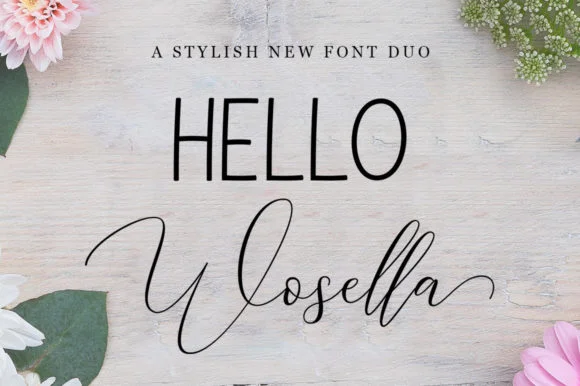
1 / 6About Wosella Duo Font
Wosella Duo Font by STRAIGHT.CO is a bold handwritten script with real character and movement. The pair of complementary styles gives you genuine flexibility: use them layered together for maximum impact, or swap between them depending on what each project demands. The dynamic letterforms work particularly well for wedding stationery and invitation suites, where you need something that feels personal without sacrificing polish. For product branding, think boutique cosmetics labels, artisanal tea packaging, or any brand wanting to stand out with handmade personality.
What makes this duo work is the weight and confidence in every letterform. They display beautifully at larger sizes without feeling fragile or over-designed, which is essential when you're working on event signage, custom business cards, or DIY craft labels that need to command real attention. The stroke consistency ensures these fonts hold up across print and digital applications equally well. You can layer them for decorative effect, or deploy them separately depending on whether you need a headline or supporting text.
If you work in design where warmth and distinctive character matter most, Wosella Duo delivers exactly that without looking generic. Get it from Creative Fabrica and you'll have a pair that works across your whole design practice.
Style & Use Cases
- Overall Style
- Elegant, Flowing, Wosella
- Use Case
- Invitations, Branding
- Ideal For
- wedding stationery, greeting cards, and signatures
- Pairs With
- a simple uppercase sans
How to Install Wosella Duo Font Font
Step-by-step instructions for every platform
- 1Download the Wosella Duo Font font file (.ttf or .otf).
- 2Locate the downloaded file in your Downloads folder.
- 3Right-click the font file.
- 4Select "Install" to install for the current user, or "Install for all users" to make it available system-wide.
- 5Wosella Duo Font is now available in Word, Photoshop, Illustrator, and all other apps.
More by STRAIGHT.CO
View all →
Browse fonts by theme
Curated collections →Saw a font in a picture? Identify any font from an image with our free Font Finder.
More Script Handwritten Fonts
Browse all →







What pairs well with Wosella Duo Font?
Wosella Duo Font is a script font that shines as a display or heading face. Pair it with a clean sans-serif or serif font for body text — the contrast creates a clear hierarchy while the two styles stay balanced and easy to read.




Wosella Duo Font
by STRAIGHT.CO
Reviewed by the FontBoxDL team · Updated June 2026