 Firefox
 1 / 7
1 / 7About Woodley Font
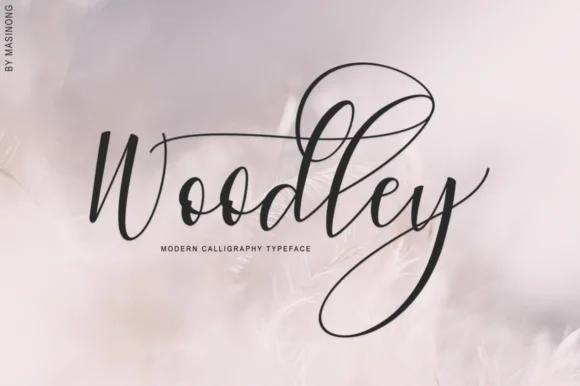
Woodley by masinong is a swash-rich script typeface that brings sophisticated movement and personality to refined display applications. The design features flowing, organic letterforms with pronounced flourishes throughout the entire character set, offering multiple weight options including Thin and Italic variants. This versatility allows designers to create dynamic visual hierarchy and emphasis within a single composition while maintaining consistent stylistic character. Whether you're designing wedding invitation suites, boutique skincare packaging, luxury stationery collections, or bespoke hand-lettered branding materials, Woodley delivers the refined elegance and personality that distinguishes upscale creative work from conventional type choices. The font's distinctive character particularly shines in premium branding applications where handcrafted aesthetic sensibility meets contemporary polish and legibility. Greeting card designs, high-end product labels, and bespoke branding projects all benefit from Woodley's expressive swash-forward approach. The accompanying Italic variant expands design possibilities for creating dynamic variations and emphasis within layouts, while the Thin weight offers delicate sophistication for breathable, elegant compositions. Woodley's flowing letterforms make it particularly suited for creative work that values personality and refinement in equal measure, projects where the typography itself communicates thoughtfulness, care, intentionality, and design thinking. Get Woodley on Creative Fabrica to start adding this distinctive script to your design toolkit.
Style & Use Cases
- Overall Style
- Elegant, Flowing, Woodley
- Use Case
- Invitations, Branding
- Ideal For
- wedding stationery, greeting cards, and signatures
- Pairs With
- a simple uppercase sans
How to Install Woodley Font Font
Step-by-step instructions for every platform
- 1Download the Woodley Font font file (.ttf or .otf).
- 2Locate the downloaded file in your Downloads folder.
- 3Right-click the font file.
- 4Select "Install" to install for the current user, or "Install for all users" to make it available system-wide.
- 5Woodley Font is now available in Word, Photoshop, Illustrator, and all other apps.
Browse fonts by theme
Curated collections →Saw a font in a picture? Identify any font from an image with our free Font Finder.
More Script Handwritten Fonts
Browse all →







What pairs well with Woodley Font?
Woodley Font is a script font that shines as a display or heading face. Pair it with a clean sans-serif or serif font for body text — the contrast creates a clear hierarchy while the two styles stay balanced and easy to read.




Woodley Font
by masinong
Reviewed by the FontBoxDL team · Updated May 2026