 Firefox
 1 / 4
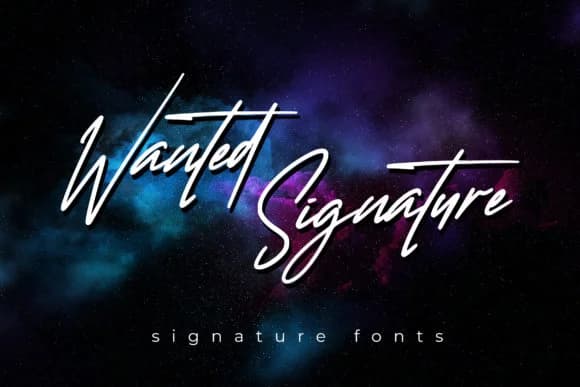
1 / 4About Wanted Signature Font
Wanted Signature captures that hand-lettered charm that makes your work feel personal and intentional. Designed by aldedesign, this script font strikes a careful balance between modern curves and authentic handwriting character. Its varying baseline gives a natural, slightly loose quality that works particularly well when you want a design to feel crafted rather than corporate or over-engineered. This combination of personality and polish is what sets it apart.
This font truly shines on wedding invitation suites, where it conveys elegance without veering into heavy formality or stiffness. You'll get solid results using it on luxury cosmetics packaging or for handwritten branding work for boutique interior design studios. Social media graphics for lifestyle brands and wellness businesses benefit tremendously from its personality and organic movement. Event signage designed with Wanted Signature stands out while maintaining a distinctly human touch, and it's worth considering for DIY craft projects or handmade product labels that need sophistication without pretension.
Smooth linework ensures it reads well at various sizes, maintaining strong legibility even when used smaller than you might initially expect. Pair it with a clean, modern sans-serif for body text to keep your typographic hierarchy sharp and readable. Wanted Signature awaits on Creative Fabrica, ready for your next project that demands character.
Style & Use Cases
- Overall Style
- Elegant, Flowing, Christmas
- Use Case
- Invitations, Branding
- Ideal For
- wedding stationery, greeting cards, and signatures
- Pairs With
- a simple uppercase sans
How to Install Wanted Signature Font Font
Step-by-step instructions for every platform
- 1Download the Wanted Signature Font font file (.ttf or .otf).
- 2Locate the downloaded file in your Downloads folder.
- 3Right-click the font file.
- 4Select "Install" to install for the current user, or "Install for all users" to make it available system-wide.
- 5Wanted Signature Font is now available in Word, Photoshop, Illustrator, and all other apps.
More by aldedesign
View all →
Browse fonts by theme
Curated collections →Saw a font in a picture? Identify any font from an image with our free Font Finder.
More Script Handwritten Fonts
Browse all →







What pairs well with Wanted Signature Font?
Wanted Signature Font is a script font that shines as a display or heading face. Pair it with a clean sans-serif or serif font for body text — the contrast creates a clear hierarchy while the two styles stay balanced and easy to read.



Wanted Signature Font
by aldedesign
Reviewed by the FontBoxDL team · Updated September 2026