 Firefox
 1 / 7
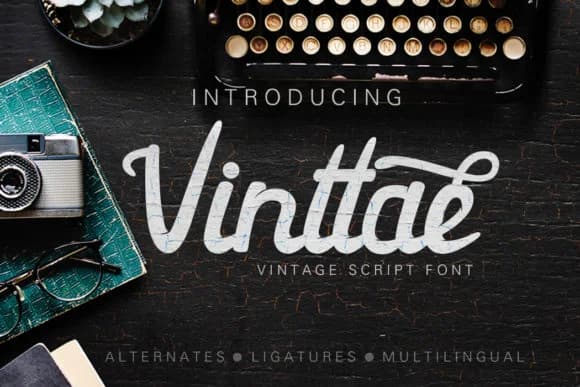
1 / 7About Vinttae Font
Vinttae Font by leamsign is a bold, smooth script that brings authentic vintage charm to contemporary design work. With its confident strokes and excellent legibility, this typeface bridges the gap between nostalgic aesthetics and modern functionality. The font includes multiple alternate versions, Vinttae Alt and Vinttae Alt 2, giving designers valuable flexibility to vary character appearance and create more organic, hand-drawn visual compositions across any single project. This script excels in projects that demand retro sophistication and warmth. Think vintage cosmetics labels where elegant letterforms enhance heritage branding, apothecary packaging that requires fine lettering with period authenticity, or wedding stationery suites where guests expect that timeless, hand-crafted aesthetic. The font also performs beautifully on heritage product packaging, allowing new brands to evoke decades of tradition, and on custom event signage where that nostalgic quality becomes essential to establishing the ideal mood and tone. The readability that leamsign built into Vinttae means you won't sacrifice clarity for atmospheric style. Whether set at large sizes on poster art or smaller sizes on product label copy, the strokes remain distinctive and legible across every application. Find Vinttae Font on Creative Fabrica and bring vintage-inspired letterforms to your next design project.
Style & Use Cases
- Overall Style
- Elegant, Flowing, Vinttae
- Use Case
- Invitations, Branding
- Ideal For
- wedding stationery, greeting cards, and signatures
- Pairs With
- a simple uppercase sans
How to Install Vinttae Font Font
Step-by-step instructions for every platform
- 1Download the Vinttae Font font file (.ttf or .otf).
- 2Locate the downloaded file in your Downloads folder.
- 3Right-click the font file.
- 4Select "Install" to install for the current user, or "Install for all users" to make it available system-wide.
- 5Vinttae Font is now available in Word, Photoshop, Illustrator, and all other apps.
Browse fonts by theme
Curated collections →Saw a font in a picture? Identify any font from an image with our free Font Finder.
More Script Handwritten Fonts
Browse all →







What pairs well with Vinttae Font?
Vinttae Font is a script font that shines as a display or heading face. Pair it with a clean sans-serif or serif font for body text — the contrast creates a clear hierarchy while the two styles stay balanced and easy to read.



Vinttae Font
by leamsign
Reviewed by the FontBoxDL team · Updated May 2026