 Firefox
 1 / 8
1 / 8About Vintage College Font
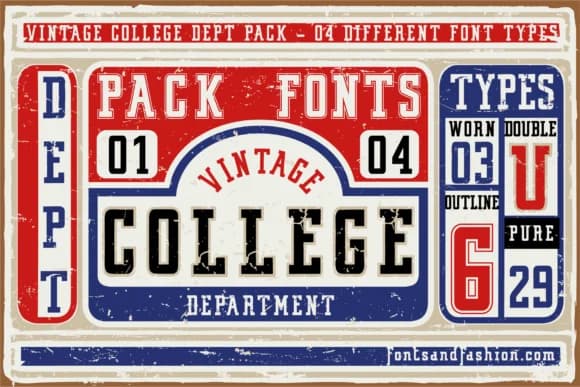
Vintage College by Fontsandfashion is a rounded slab serif that channels the solid, approachable warmth of mid-century commercial lettering. The family consists of four distinct fonts, so you have real flexibility when you need to balance headlines with supporting text across different weights and styles, or just want options for varying project demands.
What makes this typeface work is the marriage of geometric structure and soft edges. You get that grounded stability that slab serifs deliver, but without the harsh rigidity that sometimes makes the category feel dated or cold. The rounded terminals and gentle curves give it an inviting character that reads as established and trustworthy rather than trendy or aggressive. There's a quiet confidence baked into these forms.
This shines on vintage band posters, craft beverage labels, and classic coffee shop signage. It works equally well for retro sports merchandise, bookstore window displays, and diner-style menu boards. When you need to evoke a particular era or invoke that sense of an established, no-nonsense brand identity, this family has the weight range and personality to carry the work. Get it from Creative Fabrica when you're ready to build something with real character and presence.
Style & Use Cases
- Overall Style
- Sturdy, Confident
- Use Case
- Headlines, Merch
- Ideal For
- vintage posters, logos, and product packaging
- Pairs With
- a light sans-serif
How to Install Vintage College Font
Step-by-step instructions for every platform
- 1Download the Vintage College font file (.ttf or .otf).
- 2Locate the downloaded file in your Downloads folder.
- 3Right-click the font file.
- 4Select "Install" to install for the current user, or "Install for all users" to make it available system-wide.
- 5Vintage College is now available in Word, Photoshop, Illustrator, and all other apps.
More by Fontsandfashion
View all →


Browse fonts by theme
Curated collections →Saw a font in a picture? Identify any font from an image with our free Font Finder.
More Slab Serif Fonts
Browse all →







What pairs well with Vintage College Font?
Vintage College Font is a slab serif font that shines as a display or heading face. Pair it with a clean sans-serif or serif font for body text — the contrast creates a clear hierarchy while the two styles stay balanced and easy to read.



Vintage College Font
Reviewed by the FontBoxDL team · Updated August 2026