 Firefox
 1 / 9
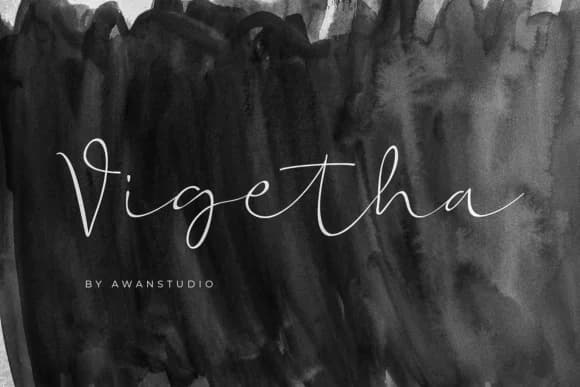
1 / 9About Vigetha Font
Vigetha by Awanstudioz is a handwritten signature script with spacious, wide letterforms that bring authentic presence to editorial and commercial projects. The generous proportions and organic flow create natural elegance without feeling overly decorative, making this typeface particularly suited for wedding invitation suites where sophisticated handwriting conveys personal warmth and refinement. Beyond formal invitations, the script excels across modern greeting card collections and boutique brand packaging, where its character adds a curated, handcrafted quality that resonates with discerning audiences.
The font's technical foundation includes generous letter spacing and subtle character variations that maintain legibility across different applications and print sizes. These qualities make Vigetha an asset for typography-focused projects where distinctive letterforms command attention. From event program designs to luxury product labels and exclusive stationery collections, the script brings personality while remaining professionally polished. The style bridges casual and refined, equally effective in contemporary editorial spreads, brand lookbooks, and packaging systems designed for brands that value authentic expression.
What distinguishes Vigetha is its balance between handmade charm and professional presentation. The letterforms breathe naturally on the page while maintaining clarity across sizes and contexts. Whether developing invitation collections, creating brand identities for boutique companies, or designing publication covers that rely on distinctive typography, this script delivers personality without compromising legibility. Discover Vigetha on Creative Fabrica and add this expressive script to your typeface toolkit.
Style & Use Cases
- Overall Style
- Elegant, Flowing, Vigetha
- Use Case
- Invitations, Branding
- Ideal For
- wedding stationery, greeting cards, and signatures
- Pairs With
- a simple uppercase sans
How to Install Vigetha Font Font
Step-by-step instructions for every platform
- 1Download the Vigetha Font font file (.ttf or .otf).
- 2Locate the downloaded file in your Downloads folder.
- 3Right-click the font file.
- 4Select "Install" to install for the current user, or "Install for all users" to make it available system-wide.
- 5Vigetha Font is now available in Word, Photoshop, Illustrator, and all other apps.
More by Awanstudioz
View all →
Browse fonts by theme
Curated collections →Saw a font in a picture? Identify any font from an image with our free Font Finder.
More Script Handwritten Fonts
Browse all →







What pairs well with Vigetha Font?
Vigetha Font is a script font that shines as a display or heading face. Pair it with a clean sans-serif or serif font for body text — the contrast creates a clear hierarchy while the two styles stay balanced and easy to read.



Vigetha Font
by Awanstudioz
Reviewed by the FontBoxDL team · Updated May 2026