 Firefox
 1 / 8
1 / 8About Vanilla Cream Font
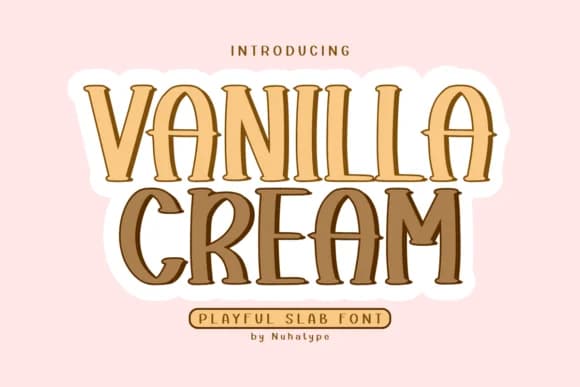
Vanilla Cream by Nuhatype is a playful slab-serif display font that brings genuine handwritten warmth to contemporary design work. The typeface features a distinctive 3D treatment with thick white outlines layered against soft brown drop shadows, creating visual depth that makes letterforms pop off the page with a crafted, approachable quality that invites engagement.
This font shines on classroom wall displays and teacher-created educational posters where readability meets personality. Handmade sticker designs benefit from its friendly charm, as do bullet journal title pages and monthly planner spreads. You'll find it equally useful on craft project labels, DIY greeting card suites, and scrapbooking page title treatments that need genuine character rather than corporate polish. The rounded, generous letterforms work especially well at larger sizes, making them ideal for children's worksheet headers, school assignment covers, and any context where you need approachable type that feels warm and inviting.
The font's personality translates across digital applications and physical craft work, moving smoothly to cutting machines and print projects alike. Hand-lettered signage, memory book embellishments, and decorative elements for creative projects aimed at younger audiences all benefit from its consistent character. Grab Vanilla Cream on Creative Fabrica and add it to your growing design collection.
Style & Use Cases
- Overall Style
- Sturdy, Confident, Cute Handwriting Font
- Use Case
- Headlines, Merch
- Ideal For
- vintage posters, logos, and product packaging
- Pairs With
- a light sans-serif
How to Install Vanilla Cream Font
Step-by-step instructions for every platform
- 1Download the Vanilla Cream font file (.ttf or .otf).
- 2Locate the downloaded file in your Downloads folder.
- 3Right-click the font file.
- 4Select "Install" to install for the current user, or "Install for all users" to make it available system-wide.
- 5Vanilla Cream is now available in Word, Photoshop, Illustrator, and all other apps.
More by Nuhatype
View all →


Browse fonts by theme
Curated collections →Saw a font in a picture? Identify any font from an image with our free Font Finder.
More Slab Serif Fonts
Browse all →







What pairs well with Vanilla Cream Font?
Vanilla Cream Font is a slab serif font that shines as a display or heading face. Pair it with a clean sans-serif or serif font for body text — the contrast creates a clear hierarchy while the two styles stay balanced and easy to read.



Vanilla Cream Font
by Nuhatype
Reviewed by the FontBoxDL team · Updated August 2026