 Firefox
 1 / 8
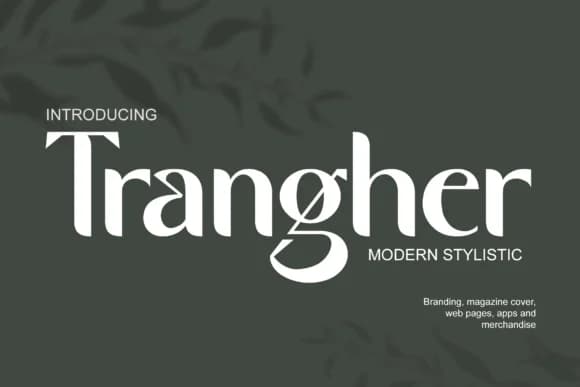
1 / 8About Trangher Font
Picture yourself designing packaging for a luxury skincare brand or laying out invitations for an upscale event venue. You need letterforms that command attention and convey sophistication without compromise. That's where Trangher comes in. Designed by Graphue, this modern slab-serif merges the visual authority of vintage typographic traditions with contemporary design sensibility, offering something that feels both grounded and current.
The font excels in contexts demanding structural strength and visual confidence. It works exceptionally well for high-end cosmetics packaging, bespoke wedding invitation suites, boutique hospitality branding, and upscale retail signage where a touch of structured elegance can set you apart. Its geometric proportions and confident letterforms read as intentional and deliberate, not trendy or disposable.
What makes it compelling is how it performs across sizes and contexts: refined enough at smaller sizes for product labels and body copy, yet commanding at large sizes for editorial display and signage. The slab-serif structure gives each letterform weight and presence without requiring excessive boldness. With multiple weights at your disposal, you can build sophisticated visual hierarchies across a complete brand system, from headlines down to supporting text, without hunting for complementary typefaces. Find it on Creative Fabrica when you need something with real presence.
Style & Use Cases
- Overall Style
- Sturdy, Confident, Vintage
- Use Case
- Headlines, Merch
- Ideal For
- vintage posters, logos, and product packaging
- Pairs With
- a light sans-serif
How to Install Trangher Font
Step-by-step instructions for every platform
- 1Download the Trangher font file (.ttf or .otf).
- 2Locate the downloaded file in your Downloads folder.
- 3Right-click the font file.
- 4Select "Install" to install for the current user, or "Install for all users" to make it available system-wide.
- 5Trangher is now available in Word, Photoshop, Illustrator, and all other apps.
More by Graphue
View all →
Browse fonts by theme
Curated collections →Saw a font in a picture? Identify any font from an image with our free Font Finder.
More Slab Serif Fonts
Browse all →







What pairs well with Trangher Font?
Trangher Font is a slab serif font that shines as a display or heading face. Pair it with a clean sans-serif or serif font for body text — the contrast creates a clear hierarchy while the two styles stay balanced and easy to read.



Trangher Font
by Graphue
Reviewed by the FontBoxDL team · Updated August 2026