 Firefox
 1 / 4
1 / 4About Tippa Font
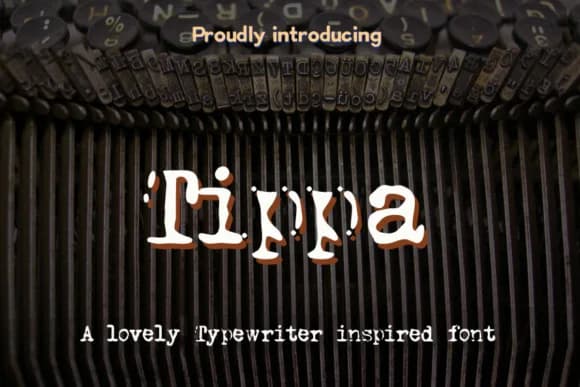
Tippa by Markus Schroppel is a slab-serif typewriter font that channels the warmth and character of vintage mechanical machines. The design captures that tactile, imperfect quality you get from old typebars striking paper, with letterforms that feel authentic and lived-in without ever sacrificing readability or utility. It's built on that quirky typewriter sensibility that design-conscious people keep reaching for.
This typeface excels in retro and forensic-style projects that need real personality and visual weight. Consider it for vintage book covers and thriller packaging, scrapbooking layouts that feel handmade, or printable recipe cards that recall a grandmother's kitchen. The chunky serifs and monospaced rhythm give everything an honest, tangible quality that connects with audiences tired of the smooth digital defaults running everywhere. Designers often reach for monospaced slab serifs precisely when they want a project to feel grounded in history.
Tippa leans hard into that mechanical typewriter aesthetic, which brings immediate credibility to work that benefits from hand-crafted authenticity or retro charm. It works equally well on a noir-inspired poster, a vintage event invitation, or in scrapbook elements, always setting the right atmosphere and tone from the first glance. Grab Tippa on Creative Fabrica and start bringing that nostalgic mechanical character into your designs.
Style & Use Cases
- Overall Style
- Sturdy, Confident
- Use Case
- Headlines, Merch
- Ideal For
- vintage posters, logos, and product packaging
- Pairs With
- a light sans-serif
How to Install Tippa Font
Step-by-step instructions for every platform
- 1Download the Tippa font file (.ttf or .otf).
- 2Locate the downloaded file in your Downloads folder.
- 3Right-click the font file.
- 4Select "Install" to install for the current user, or "Install for all users" to make it available system-wide.
- 5Tippa is now available in Word, Photoshop, Illustrator, and all other apps.
More by Markus Schroppel
View all →


Browse fonts by theme
Curated collections →Saw a font in a picture? Identify any font from an image with our free Font Finder.
More Slab Serif Fonts
Browse all →







What pairs well with Tippa Font?
Tippa Font is a slab serif font that shines as a display or heading face. Pair it with a clean sans-serif or serif font for body text — the contrast creates a clear hierarchy while the two styles stay balanced and easy to read.



Tippa Font
Reviewed by the FontBoxDL team · Updated August 2026