 Firefox
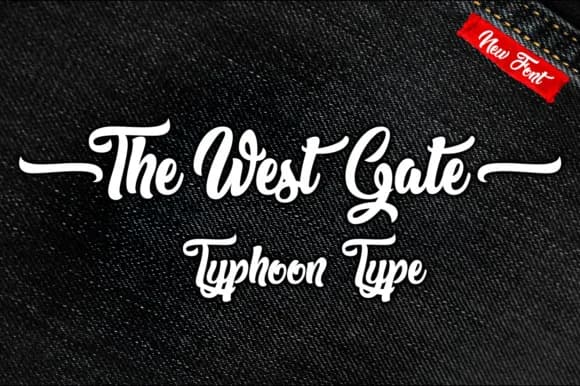
About The West Gate Font
The West Gate by Typhoon Type™ is a heavyweight script font rooted in the visual language of mid-20th century design. With its bold, flowing letterforms, this typeface captures the authentic aesthetic of classic lettering traditions, making it an exceptional choice for projects that demand genuine vintage character and timeless appeal. The font's substantial weight ensures it commands attention on any application, from headlines to display usage.
Whether you're designing speakeasy bar menus, creating vintage-inspired wedding invitations, or developing retro branding materials for boutique establishments, The West Gate brings authentic period charm to your work. This font excels for classic diner signage, vintage restaurant branding, and nostalgic poster designs that celebrate design history. The script's flowing letterforms maintain excellent readability despite their decorative nature, allowing the typeface to work effectively across both display and headline applications without sacrificing legibility. Its heavyweight structure adds presence and personality to any vintage-themed project.
The West Gate's distinctive retro personality makes it ideal for designers and creatives seeking to infuse genuine nostalgia into contemporary projects without sacrificing modern sophistication. Whether you're working on editorial designs, packaging, or branding initiatives that require a classic aesthetic, this font delivers the period authenticity that brings vintage concepts to life. Get The West Gate on Creative Fabrica and add this distinctive retro font to your typography collection.
Style & Use Cases
- Overall Style
- Elegant, Flowing, The West Gate
- Use Case
- Invitations, Branding
- Ideal For
- wedding stationery, greeting cards, and signatures
- Pairs With
- a simple uppercase sans
How to Install The West Gate Font Font
Step-by-step instructions for every platform
- 1Download the The West Gate Font font file (.ttf or .otf).
- 2Locate the downloaded file in your Downloads folder.
- 3Right-click the font file.
- 4Select "Install" to install for the current user, or "Install for all users" to make it available system-wide.
- 5The West Gate Font is now available in Word, Photoshop, Illustrator, and all other apps.
More by Typhoon Type™
View all →



Browse fonts by theme
Curated collections →Saw a font in a picture? Identify any font from an image with our free Font Finder.
More Script Handwritten Fonts
Browse all →







What pairs well with The West Gate Font?
The West Gate Font is a script font that shines as a display or heading face. Pair it with a clean sans-serif or serif font for body text — the contrast creates a clear hierarchy while the two styles stay balanced and easy to read.



The West Gate Font
Reviewed by the FontBoxDL team · Updated May 2026