 Firefox
 1 / 9
1 / 9About The Bouquet List Font
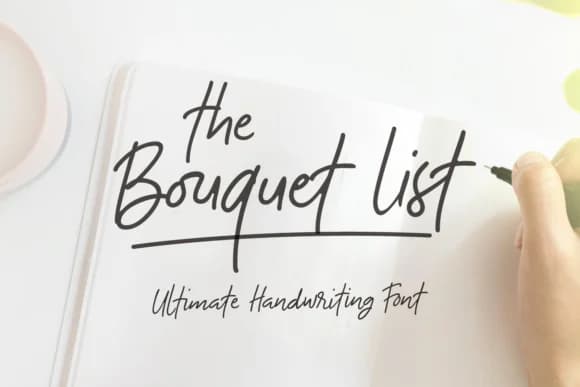
The Bouquet List by Nasir Udin is a signature-style handwritten script that brings authentic personal warmth and genuine elegance to design projects where character matters. This typeface family shines when applied to specialized applications like custom wedding invitation suites, personalized thank you card designs, boutique greeting card collections, and upscale event stationery, contexts where a handwritten aesthetic meaningfully communicates craftsmanship, attention to detail, and intentional design. The script's flowing, organic letterforms render clearly across both print and digital platforms, maintaining strong legibility while preserving the intimate, personal quality of genuine handwriting that feels distinctly human rather than mechanically produced. With The Bouquet List Bold and The Bouquet List Extras variants included in the package, you gain multiple stylistic weights and expanded character support for international text, special symbols, and decorative flourishes, making this a genuinely versatile choice for extended typographic work across different cultural contexts. The font pairs thoughtfully with more structured serif or sans-serif typefaces, creating visual hierarchy without competing for attention or overwhelming supporting text. Rather than stretching across endless generic project types, The Bouquet List performs best when given dedicated space to anchor headlines, emphasize key messaging, or serve as the primary voice in intimate, carefully crafted communications. Discover this signature script on Creative Fabrica and bring authentic handwritten elegance to your next design.
Style & Use Cases
- Overall Style
- Elegant, Flowing, The Bouquet List
- Use Case
- Invitations, Branding
- Ideal For
- wedding stationery, greeting cards, and signatures
- Pairs With
- a simple uppercase sans
How to Install The Bouquet List Font Font
Step-by-step instructions for every platform
- 1Download the The Bouquet List Font font file (.ttf or .otf).
- 2Locate the downloaded file in your Downloads folder.
- 3Right-click the font file.
- 4Select "Install" to install for the current user, or "Install for all users" to make it available system-wide.
- 5The Bouquet List Font is now available in Word, Photoshop, Illustrator, and all other apps.
More by Nasir Udin
View all →



Browse fonts by theme
Curated collections →Saw a font in a picture? Identify any font from an image with our free Font Finder.
More Script Handwritten Fonts
Browse all →







What pairs well with The Bouquet List Font?
The Bouquet List Font is a script font that shines as a display or heading face. Pair it with a clean sans-serif or serif font for body text — the contrast creates a clear hierarchy while the two styles stay balanced and easy to read.



The Bouquet List Font
by Nasir Udin
Reviewed by the FontBoxDL team · Updated May 2026