 Firefox
 1 / 8
1 / 8About Texture Foliage Font
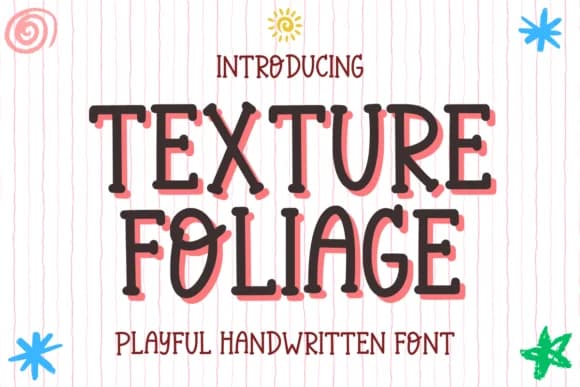
Picture yourself handwriting a child's birthday card or decorating a personal planner with a typeface that matches the playful energy you're actually feeling. Texture Foliage, designed by Letterayu, is a slab serif that brings together bubbly letterforms and a gently handwritten warmth without veering into saccharine territory. The typeface shines brightest in projects where friendliness and approachability matter more than formal precision. Think custom journal covers for teens, DIY sticker sheets for organizing and decorating, birth announcement cards, or product labels for small-batch items made for young families. Its rounded forms and handwritten character read clearly at any size, whether you're working small on a planner spread or large on a poster for a kid's room.
The consistent weight throughout the alphabet works well in both digital and print production. From vinyl decals to screen-printed baby garments to laser-cut craft tags, Texture Foliage keeps its character intact through various production processes while staying legible even when details compress. Your message lands with clarity and warmth, regardless of the medium or production method you choose.
Head to Creative Fabrica to grab this one and bring that hand-drawn energy to your next project.
Style & Use Cases
- Overall Style
- Sturdy, Confident, Cute
- Use Case
- Headlines, Merch
- Ideal For
- vintage posters, logos, and product packaging
- Pairs With
- a light sans-serif
How to Install Texture Foliage Font
Step-by-step instructions for every platform
- 1Download the Texture Foliage font file (.ttf or .otf).
- 2Locate the downloaded file in your Downloads folder.
- 3Right-click the font file.
- 4Select "Install" to install for the current user, or "Install for all users" to make it available system-wide.
- 5Texture Foliage is now available in Word, Photoshop, Illustrator, and all other apps.
More by Letterayu
View all →
Browse fonts by theme
Curated collections →Saw a font in a picture? Identify any font from an image with our free Font Finder.
More Slab Serif Fonts
Browse all →







What pairs well with Texture Foliage Font?
Texture Foliage Font is a slab serif font that shines as a display or heading face. Pair it with a clean sans-serif or serif font for body text — the contrast creates a clear hierarchy while the two styles stay balanced and easy to read.



Texture Foliage Font
by Letterayu
Reviewed by the FontBoxDL team · Updated August 2026