 Firefox
 1 / 3
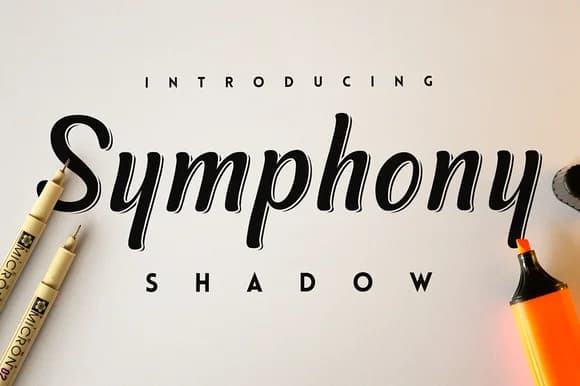
1 / 3About Symphony Shadow Font
Symphony Shadow Font by SNK is a flowing script typeface featuring an elegant shadow effect that brings dimensional depth to hand-lettered designs. The graceful curves and artistic letterforms capture the organic quality of brushwork while maintaining legibility across various sizes and mediums.
This typeface excels in applications where sophistication matters. Wedding invitation suites gain romantic appeal through its flowing lines, while boutique product packaging benefits from the shadow's layered visual interest. Greeting card designs showcase the typeface's versatility, and custom vinyl decal projects leverage the shadow effect for striking three-dimensional results. Social media graphics, branding materials, and event signage all showcase this script's ability to convey elegance without sacrificing clarity. The font integrates smoothly with design platforms including Canva, Adobe Photoshop, and Illustrator, giving creatives flexibility across their preferred tools.
The shadow effect is rendered as an integrated design element, creating immediate visual impact without requiring manual layering. Whether you're designing heat transfer projects, editorial layouts, or personalized stationery, Symphony Shadow Font delivers the polished, artistic character that discerning brands and designers seek. Find Symphony Shadow Font on Creative Fabrica to add this sophisticated script to your collection.
Style & Use Cases
- Overall Style
- Elegant, Flowing, Symphony Shadow
- Use Case
- Invitations, Branding
- Ideal For
- wedding stationery, greeting cards, and signatures
- Pairs With
- a simple uppercase sans
How to Install Symphony Shadow Font Font
Step-by-step instructions for every platform
- 1Download the Symphony Shadow Font font file (.ttf or .otf).
- 2Locate the downloaded file in your Downloads folder.
- 3Right-click the font file.
- 4Select "Install" to install for the current user, or "Install for all users" to make it available system-wide.
- 5Symphony Shadow Font is now available in Word, Photoshop, Illustrator, and all other apps.
More by SNK
View all →
Browse fonts by theme
Curated collections →Saw a font in a picture? Identify any font from an image with our free Font Finder.
More Script Handwritten Fonts
Browse all →







What pairs well with Symphony Shadow Font?
Symphony Shadow Font is a script font that shines as a display or heading face. Pair it with a clean sans-serif or serif font for body text — the contrast creates a clear hierarchy while the two styles stay balanced and easy to read.



Symphony Shadow Font
by SNK
Reviewed by the FontBoxDL team · Updated May 2026