 Firefox
 1 / 8
1 / 8Loading font…
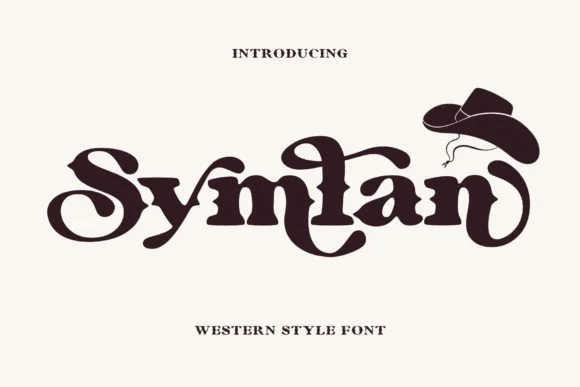
About Symlan Font
Symlan by Sealoung is a slab-serif with thick, angular brackets that anchor each letterform firmly in place, giving the whole typeface a weathered, substantial quality. The design draws inspiration from Old West vernacular signage and vintage brand marks, yet avoids the trap of clichéd ornamentation that often plagues this category. Every character feels deliberate and grounded, with sturdy proportions that speak quiet confidence whether applied to formal business contexts or rougher, handmade work.
This typeface works beautifully for rustic wedding invitation suites, vintage whiskey and craft beer label design, and country lifestyle branding that demands real typographic backbone. The strong weight and confident letterforms excel on DIY craft wood signs and retail displays where understated strength means far more than decoration. Its formal structure combined with worn-in character makes it equally suited to heritage brand identity systems, hospitality menus, and cultural event posters.
Best for designers building cohesive brand systems around western, retro, or masculine aesthetics, Symlan brings authentic substance to projects that demand genuine presence. Whiskey houses and heritage retailers find it invaluable for establishing lasting credibility through form and weight alone. Find it on Creative Fabrica.
Style & Use Cases
- Overall Style
- Sturdy, Confident, Serif
- Use Case
- Headlines, Merch
- Ideal For
- vintage posters, logos, and product packaging
- Pairs With
- a light sans-serif
OpenType Features
Symlan ships with 3 OpenType features you can switch on in apps that support them (Illustrator, InDesign, Affinity, Figma, CSS font-feature-settings).
- Standard ligatures
- Stylistic alternates
- Stylistic sets (2)
How to Install Symlan Font
Step-by-step instructions for every platform
- 1Download the Symlan font file (.ttf or .otf).
- 2Locate the downloaded file in your Downloads folder.
- 3Right-click the font file.
- 4Select "Install" to install for the current user, or "Install for all users" to make it available system-wide.
- 5Symlan is now available in Word, Photoshop, Illustrator, and all other apps.
More by Sealoung
View all →
Browse fonts by theme
Curated collections →Saw a font in a picture? Identify any font from an image with our free Font Finder.
More Slab Serif Fonts
Browse all →







What pairs well with Symlan Font?
Symlan Font is a slab serif font that shines as a display or heading face. Pair it with a clean sans-serif or serif font for body text — the contrast creates a clear hierarchy while the two styles stay balanced and easy to read.




Symlan Font
by Sealoung
Reviewed by the FontBoxDL team · Updated October 2026