 Firefox
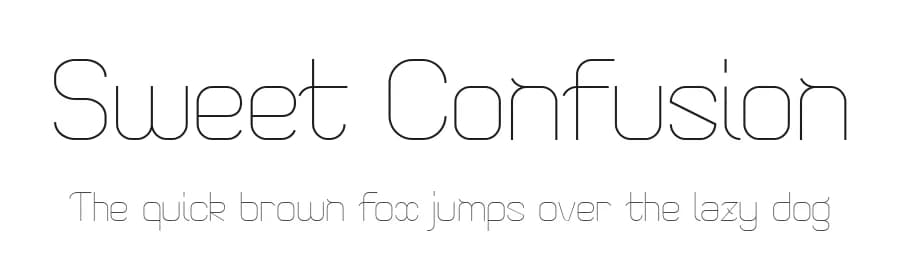 1 / 3
1 / 3Loading font…
About Sweet Confusion Font
++The personnal and/or non-commercial uses of this font are FREE. However donations are accepted and appreciated :
www.reticula.net
! Thank you for also sending me your creations ;)
++The professional and/or commercial uses of this font are PROHIBITED unless you pay the fee of the commercial licence for the PRO version. (see below how to contact me for details ). PRO version includes 299 characters, accentuated & special glyphs, ligatures, font embedding, enhanced kerning, ...
++You are not allowed to distribute these fonts, whatever the media (web, cd, zip, ...) without my express permission. Contact me for details.
++You may never ever sell my fonts, include them on CD's or make any changes to the files.
E-mail: contact*at*reticula*dot*net
WWW:
http://www.reticula.net
___________________________________________________
++L'usage de cette police est GRATUIT pour une utilisation personnelle et/ou non-commerciale. Toutefois j'acccepte volontiers les dons :
www.reticula.fr
! Merci de bien vouloir également m'envoyer vos créations ;)
++L'usage de cette police est INTERDIT pour une utilisation professionnel et/ou commercial sans vous acquitter de la licence commerciale de la version PRO, voir ci-dessous comment me contacter pour les détails. La version PRO inclue 299 caractères, les caractères accentués & spéciaux, des ligatures, incorporation autorisée, kerning amélioré, ...
++Vous n'êtes pas autorisé à distribuer cette police, quelque soit la forme (web, cd, zip, ...) sans ma permission expresse. Contactez-moi pour les détails.
More...
++Interdiction absolue de modifier, revendre ou inclure la police sur un CD.
E-mail: contact*at*reticula*point*fr
WWW:
http://www.reticula.fr
Style & Use Cases
- Overall Style
- Light, Clean, Modern, Basic
- Use Case
- Body Text, UI
- Ideal For
- branding, interfaces, and modern layouts
- Pairs With
- a contrasting serif for headings
Similar Fonts
Fonts that look visually alike — matched by our Font Finder model.



Sweet Confusion Specifications
| Font Family | Sweet Confusion |
| Style | Regular |
| Full Name | Sweet Confusion Light |
| Version | 1.001 2011 |
| Weight | 300 (Light) |
| Glyph Count | 146 glyphs |
| PostScript Name | SweetConfusion-Light |
| Designer | Vincent Wicky |
| Format | TTF (TrueType) |
| File Size | 119.1 KB |
Languages Supported
Sweet Confusion supports 107 languages.
How to Install Sweet Confusion Font
Step-by-step instructions for every platform
- 1Download the Sweet Confusion font file (.ttf or .otf).
- 2Locate the downloaded file in your Downloads folder.
- 3Right-click the font file.
- 4Select "Install" to install for the current user, or "Install for all users" to make it available system-wide.
- 5Sweet Confusion is now available in Word, Photoshop, Illustrator, and all other apps.
More by Vinz
View all →

Browse fonts by theme
Curated collections →Saw a font in a picture? Identify any font from an image with our free Font Finder.
More Sans Serif Fonts
Browse all →


What pairs well with Sweet Confusion Font?
Sweet Confusion Font is a versatile sans-serif font that works for both headings and body text. Pair it with a contrasting serif or slab serif font to add visual interest and a clear distinction between titles and body copy.



Premium Sans Serif Fonts
★ PremiumWant something with more weights, glyphs, and commercial polish? These premium sans serif fonts are worth a look.


Sweet Confusion Font
by Vinz
Reviewed by the FontBoxDL team · Updated June 2026