 Firefox
 1 / 5
1 / 5About Sweet and Sour Font
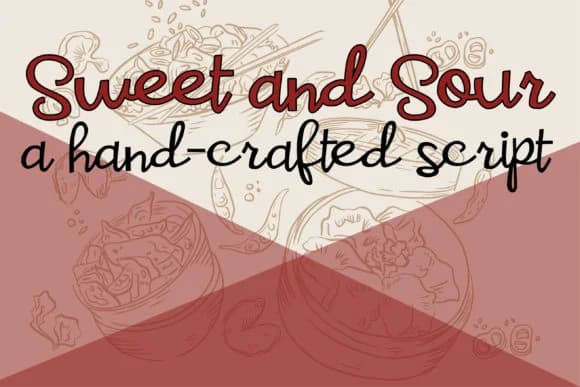
Sweet and Sour Font by Illustration Ink is a casual handwritten script that captures the loose, organic feel of pen on paper. With a medium weight that's both readable and characterful, this typeface works across a range of creative projects where personality matters more than formality. The hand-drawn quality gives each letter a lived-in charm that feels genuine rather than contrived.
This font excels at intimate applications where warmth connects with your audience. Handmade greeting cards gain an authentic touch when set in this script, while wedding invitation suites benefit from the approachable elegance it brings. Personal stationery and gift tags feel genuinely thoughtful when rendered in Illustration Ink's distinctive strokes. Scrapbooking layouts and memory books also sing with this typeface, since the informal letterforms align perfectly with the handcrafted aesthetic most people instinctively chase in memory-focused projects.
Lettering bullet journal headers, adding artisan product labels, and designing DIY craft signage for handmade goods all become effortless with this friendly typeface. The medium weight keeps everything legible at various sizes while maintaining that sketch-like spontaneity. Grab Sweet and Sour Font on Creative Fabrica and unlock the handcrafted warmth that makes people stop and really look twice at your work.
Style & Use Cases
- Overall Style
- Elegant, Flowing, Sweet And Sour
- Use Case
- Invitations, Branding
- Ideal For
- wedding stationery, greeting cards, and signatures
- Pairs With
- a simple uppercase sans
How to Install Sweet and Sour Font Font
Step-by-step instructions for every platform
- 1Download the Sweet and Sour Font font file (.ttf or .otf).
- 2Locate the downloaded file in your Downloads folder.
- 3Right-click the font file.
- 4Select "Install" to install for the current user, or "Install for all users" to make it available system-wide.
- 5Sweet and Sour Font is now available in Word, Photoshop, Illustrator, and all other apps.
More by Illustration Ink
View all →



Browse fonts by theme
Curated collections →Saw a font in a picture? Identify any font from an image with our free Font Finder.
More Script Handwritten Fonts
Browse all →







What pairs well with Sweet and Sour Font?
Sweet and Sour Font is a script font that shines as a display or heading face. Pair it with a clean sans-serif or serif font for body text — the contrast creates a clear hierarchy while the two styles stay balanced and easy to read.



Sweet and Sour Font
Reviewed by the FontBoxDL team · Updated June 2026