 Firefox
 1 / 9
1 / 9About Sunshine Font
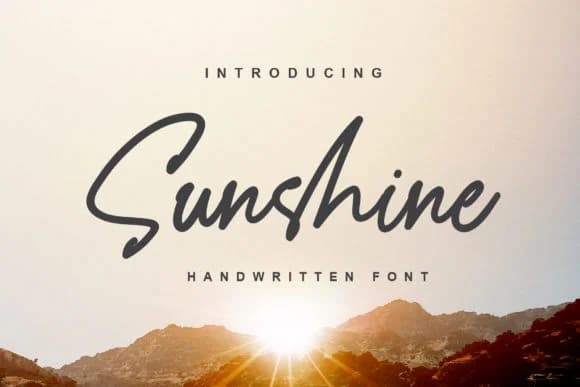
Sunshine feels warm and personal, like a trusted friend's handwriting. Designed by alphArt, this handwritten script captures the authentic charm of genuine handwriting while maintaining elegant, flowing letterforms that feel intentional rather than careless or hard to read. The careful balance between simplicity and character allows it to work across surprisingly diverse applications without ever clashing with the surrounding design.
Wedding invitations and personalized thank-you cards gain genuine warmth from this typeface's natural rhythm. Hand-lettered product packaging and artisan labels benefit from its approachable authority, especially for boutique skincare brands, small-batch confections, or handmade craft makers. Greeting card designers appreciate how legible the letterforms remain even at modest sizes. Bloggers and social media creators reach for it when they need to personalize headers, highlight key quotes, or add a handwritten voice to visual posts and Stories. Scrapbooking layouts gain a nostalgic, warm character from its flowing letterforms.
Pair Sunshine with a straightforward sans-serif for body copy and you get instant visual harmony. The contrast keeps designs feeling grounded and intentional. Grab this font from Creative Fabrica and start using it wherever you want genuine, handwritten warmth without the guesswork.
Style & Use Cases
- Overall Style
- Elegant, Flowing, Sunshine
- Use Case
- Invitations, Branding
- Ideal For
- wedding stationery, greeting cards, and signatures
- Pairs With
- a simple uppercase sans
How to Install Sunshine Font Font
Step-by-step instructions for every platform
- 1Download the Sunshine Font font file (.ttf or .otf).
- 2Locate the downloaded file in your Downloads folder.
- 3Right-click the font file.
- 4Select "Install" to install for the current user, or "Install for all users" to make it available system-wide.
- 5Sunshine Font is now available in Word, Photoshop, Illustrator, and all other apps.

Browse fonts by theme
Curated collections →Saw a font in a picture? Identify any font from an image with our free Font Finder.
More Script Handwritten Fonts
Browse all →







What pairs well with Sunshine Font?
Sunshine Font is a script font that shines as a display or heading face. Pair it with a clean sans-serif or serif font for body text — the contrast creates a clear hierarchy while the two styles stay balanced and easy to read.



Sunshine Font
by alphArt
Reviewed by the FontBoxDL team · Updated June 2026