 Firefox
 1 / 6
1 / 6About Styla Font
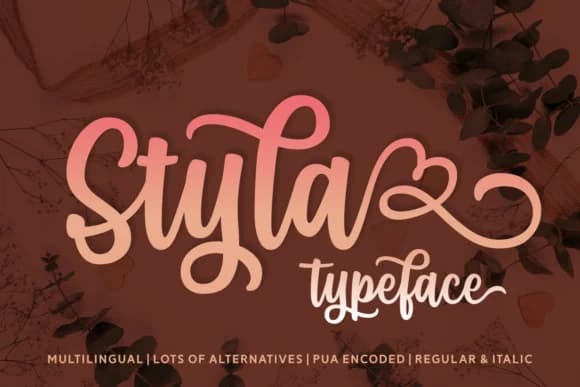
Styla by Situjuh is a bold, streetwise handwritten script that brings raw energy to any design work. The flowing letterforms have an organic, sketchy quality that feels contemporary without trying too hard. It's the kind of font that makes work feel alive, especially when you want the viewer to feel something rather than just read something. The letters sprawl across the page with confidence.
You'll find this works particularly well for fashion brand lookbooks, graffiti-inspired poster campaigns, and music event flyers where you need something with genuine edge. Etsy sellers reach for it for streetwear labels and vintage clothing tags that need credibility. There's also a natural fit for hip restaurant menus, coffee shop branding, and contemporary art gallery materials where a polished serif would kill the mood entirely. The italic option gives you another dimension for adding emphasis or creating layered compositions without hunting for a separate typeface.
The spontaneous, hand-drawn character makes it feel authentic in spaces where studio perfection would actually work against you. If you're looking for a script that reads as real rather than precious, this one deserves a spot in your collection. Head to Creative Fabrica to add Styla to your library.
Style & Use Cases
- Overall Style
- Elegant, Flowing, Styla
- Use Case
- Invitations, Branding
- Ideal For
- wedding stationery, greeting cards, and signatures
- Pairs With
- a simple uppercase sans
How to Install Styla Font Font
Step-by-step instructions for every platform
- 1Download the Styla Font font file (.ttf or .otf).
- 2Locate the downloaded file in your Downloads folder.
- 3Right-click the font file.
- 4Select "Install" to install for the current user, or "Install for all users" to make it available system-wide.
- 5Styla Font is now available in Word, Photoshop, Illustrator, and all other apps.

Browse fonts by theme
Curated collections →Saw a font in a picture? Identify any font from an image with our free Font Finder.
More Script Handwritten Fonts
Browse all →







What pairs well with Styla Font?
Styla Font is a script font that shines as a display or heading face. Pair it with a clean sans-serif or serif font for body text — the contrast creates a clear hierarchy while the two styles stay balanced and easy to read.



Styla Font
by Situjuh
Reviewed by the FontBoxDL team · Updated June 2026