 Firefox
 1 / 9
1 / 9About Strings Font
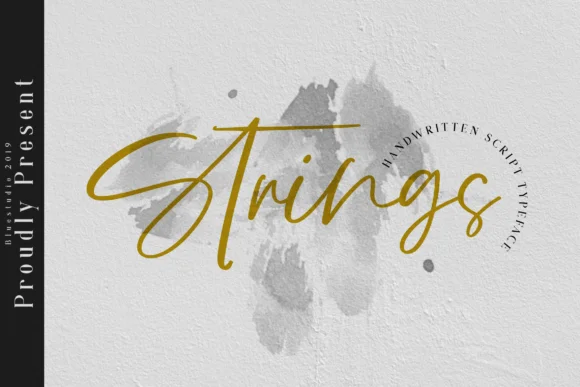
Strings by Bluestudio is a hand-lettered script that captures real handwriting's warmth and personality without pretension. Every letterform carries organic flow and natural variation, the kind you get from drawing with actual ink rather than mathematical precision. The font remains legible at any size, whether you're setting headlines or running text, which is harder to achieve than it sounds with scripts this loose and expressive.
This script excels for wedding invitation suites where couples want something personal and memorable rather than sterile perfection, boutique skincare and cosmetics packaging that needs visual elegance on small labels, DIY craft signage for handmade market sellers, and custom greeting cards where authentic letterforms make a genuine emotional impact. The character set includes varied alternates that prevent repetitive sameness across longer passages, so running text stays visually interesting without feeling overwrought or exhausting.
Hand-lettered scripts often sacrifice functionality for style, but Strings manages both at once. The handwritten quality feels deliberate rather than chaotic, giving you a font that works for anything from Instagram caption typography to printed collateral and packaging. It's the kind of script that reminds viewers that real design comes from real hands. Get it from Creative Fabrica and start using it in your next project.
Style & Use Cases
- Overall Style
- Elegant, Flowing, Strings
- Use Case
- Invitations, Branding
- Ideal For
- wedding stationery, greeting cards, and signatures
- Pairs With
- a simple uppercase sans
How to Install Strings Font Font
Step-by-step instructions for every platform
- 1Download the Strings Font font file (.ttf or .otf).
- 2Locate the downloaded file in your Downloads folder.
- 3Right-click the font file.
- 4Select "Install" to install for the current user, or "Install for all users" to make it available system-wide.
- 5Strings Font is now available in Word, Photoshop, Illustrator, and all other apps.
More by Bluestudio
View all →

Browse fonts by theme
Curated collections →Saw a font in a picture? Identify any font from an image with our free Font Finder.
More Script Handwritten Fonts
Browse all →







What pairs well with Strings Font?
Strings Font is a script font that shines as a display or heading face. Pair it with a clean sans-serif or serif font for body text — the contrast creates a clear hierarchy while the two styles stay balanced and easy to read.




Strings Font
by Bluestudio
Reviewed by the FontBoxDL team · Updated September 2026