 Firefox
 1 / 5
1 / 5About Stephia Font
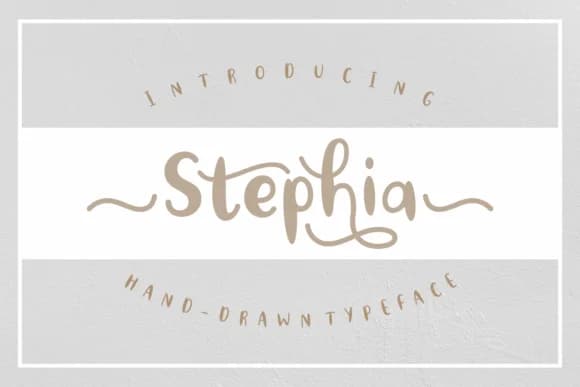
Stephia, designed by Rifki at 7ntypes, is a flowing script with softly rounded letterforms that feel handwritten without sacrificing legibility. The style captures genuine pen-on-paper warmth and personality, working equally well at large display sizes and in smaller moments where subtlety matters most. Its character comes through in every curve and connection.
This font thrives in handmade product labels, gift tags, and personalized packaging projects where authentic feel counts. Wedding invitation suites get a boost from its soft, friendly presence, and greeting card designs benefit from the natural rhythm of the letterforms. Small business owners gravitate toward it for thank-you cards, Etsy product branding, and custom packaging, while DIY crafters use it on gift wrap designs, hand-lettered wall quotes, and personalized stationery. The readable letterforms hold their own whether you're working at display size or text size.
What makes Stephia stand out is that warmth-to-function balance. The letters stay clear and distinct even when sized small, making it reliable for applications where legibility matters. It's ideal for makers and designers building custom goods, invitations, and event materials that need personality without pretension. Grab Stephia on Creative Fabrica and start adding genuine character to your projects.
Style & Use Cases
- Overall Style
- Elegant, Flowing, Stephia
- Use Case
- Invitations, Branding
- Ideal For
- wedding stationery, greeting cards, and signatures
- Pairs With
- a simple uppercase sans
How to Install Stephia Font Font
Step-by-step instructions for every platform
- 1Download the Stephia Font font file (.ttf or .otf).
- 2Locate the downloaded file in your Downloads folder.
- 3Right-click the font file.
- 4Select "Install" to install for the current user, or "Install for all users" to make it available system-wide.
- 5Stephia Font is now available in Word, Photoshop, Illustrator, and all other apps.
More by Rifki (7ntypes)
View all →
Browse fonts by theme
Curated collections →Saw a font in a picture? Identify any font from an image with our free Font Finder.
More Script Handwritten Fonts
Browse all →







What pairs well with Stephia Font?
Stephia Font is a script font that shines as a display or heading face. Pair it with a clean sans-serif or serif font for body text — the contrast creates a clear hierarchy while the two styles stay balanced and easy to read.



Stephia Font
Reviewed by the FontBoxDL team · Updated May 2026