 Firefox
 1 / 8
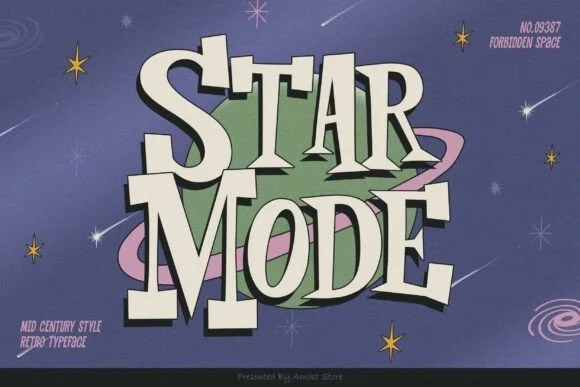
1 / 8About Star Mode Font
This font captures that cozy, retro punch of mid-century design. Star Mode, created by AMost Store, is a slab-serif display typeface that wears its vintage personality with genuine character and presence. Thick, sturdy letterforms deliver immediate visual weight, making it ideal for anything that needs to grab attention and hold it.
Where Star Mode truly shines is in retro diner signage, vintage cosmetics and beauty packaging with a genuine 1950s edge, craft cocktail menus with old-school flair, and mid-century poster work. All these applications come alive with this typeface. The boldness reads well at large sizes and works beautifully in short bursts of text where impact matters more than lengthy copy. Its emblematic quality makes it feel at home on everything from vintage badge and emblem designs to boutique candy labels, craft stationery, and product packaging that channels old-world charm. That authentic period feel makes the work look like it was truly designed decades ago rather than yesterday.
Pair Star Mode with a clean, geometric sans-serif for body text or secondary copy, letting it do the heavy lifting on headers and titles. You'll find it on Creative Fabrica ready to bring that authentic retro flair to your next project.
Style & Use Cases
- Overall Style
- Sturdy, Confident, Retro
- Use Case
- Headlines, Merch
- Ideal For
- vintage posters, logos, and product packaging
- Pairs With
- a light sans-serif
How to Install Star Mode Font
Step-by-step instructions for every platform
- 1Download the Star Mode font file (.ttf or .otf).
- 2Locate the downloaded file in your Downloads folder.
- 3Right-click the font file.
- 4Select "Install" to install for the current user, or "Install for all users" to make it available system-wide.
- 5Star Mode is now available in Word, Photoshop, Illustrator, and all other apps.
More by AMost Store
View all →
Browse fonts by theme
Curated collections →Saw a font in a picture? Identify any font from an image with our free Font Finder.
More Slab Serif Fonts
Browse all →







What pairs well with Star Mode Font?
Star Mode Font is a slab serif font that shines as a display or heading face. Pair it with a clean sans-serif or serif font for body text — the contrast creates a clear hierarchy while the two styles stay balanced and easy to read.




Star Mode Font
by AMost Store
Reviewed by the FontBoxDL team · Updated August 2026