 Firefox
 1 / 9
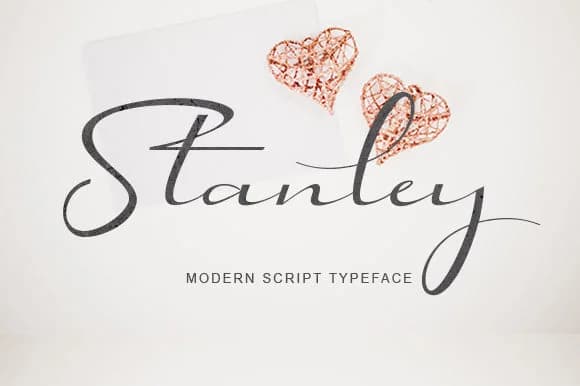
1 / 9About Stanley Script Font
Stanley Script, designed by utopiabrand19, features fluid letterforms that capture the warmth of handwritten elegance without sacrificing legibility across sizes. The flowing curves and naturally connected characters convey sophistication while maintaining the approachable feel of something written by hand. This balance makes it versatile for both formal occasions and contemporary branding projects that benefit from a more human touch.
The font excels in work that balances refinement with genuine character. Wedding invitation suites gain immediate prestige from these letterforms, while boutique skincare packaging and Etsy product labels benefit from the handcrafted impression the typeface conveys. Personal stationery, fine dining menus, and monogram designs all showcase the script beautifully, each gaining that sense of care in their details. Cosmetic branding projects also take on an upscale quality. The flowing nature of the letters means spacing and placement matter, but once you get that right, the results feel intentional and considered.
Designers and small business owners working on premium positioning will find this font does the heavy lifting. If you're creating work where handwritten charm needs to feel both current and trustworthy, Stanley Script belongs in your toolkit. It's available on Creative Fabrica.
Style & Use Cases
- Overall Style
- Elegant, Flowing, Stanley Script
- Use Case
- Invitations, Branding
- Ideal For
- wedding stationery, greeting cards, and signatures
- Pairs With
- a simple uppercase sans
How to Install Stanley Script Font Font
Step-by-step instructions for every platform
- 1Download the Stanley Script Font font file (.ttf or .otf).
- 2Locate the downloaded file in your Downloads folder.
- 3Right-click the font file.
- 4Select "Install" to install for the current user, or "Install for all users" to make it available system-wide.
- 5Stanley Script Font is now available in Word, Photoshop, Illustrator, and all other apps.
More by utopiabrand19
View all →
Browse fonts by theme
Curated collections →Saw a font in a picture? Identify any font from an image with our free Font Finder.
More Script Handwritten Fonts
Browse all →







What pairs well with Stanley Script Font?
Stanley Script Font is a script font that shines as a display or heading face. Pair it with a clean sans-serif or serif font for body text — the contrast creates a clear hierarchy while the two styles stay balanced and easy to read.



Stanley Script Font
Reviewed by the FontBoxDL team · Updated September 2026