 Firefox
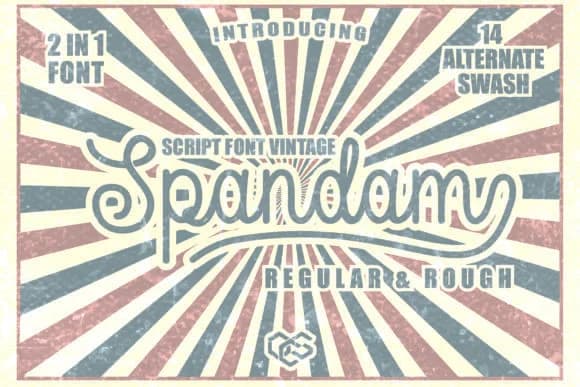 1 / 9
1 / 9About Spandam Font
Script fonts with genuine personality are rarer than they seem, and Spandam is one that genuinely stands out. Designed by OCS Studio, this handwritten style captures an easygoing warmth that feels personal without tipping into overly decorative territory.
Wedding invitation suites and save-the-dates are natural homes for Spandam, where its casual letterforms read as sincere and intimate. The same applies to Valentine's day cards, baby shower announcements, and Easter-themed designs that rely on an approachable, friendly tone. Beyond traditional stationery, you'll find it works beautifully for monogram work on custom jewelry, Etsy product labels for small makers and indie brands, and DIY wood signs for retail spaces. Personalized stationery, handmade craft projects, and artisan packaging all gain warmth and personality when set in Spandam. The font strikes a balance between having enough visual presence to catch attention while staying legible across different applications, sizes, and contexts.
Pair Spandam with a clean, geometric sans-serif for any body text to let both fonts do their best work. The contrast between organic script and structured sans creates excellent balance in layouts and keeps longer passages readable and accessible, even when a design calls for personality and character. Grab it free on Creative Fabrica.
Style & Use Cases
- Overall Style
- Elegant, Flowing, Easter
- Use Case
- Invitations, Branding
- Ideal For
- wedding stationery, greeting cards, and signatures
- Pairs With
- a simple uppercase sans
How to Install Spandam Font Font
Step-by-step instructions for every platform
- 1Download the Spandam Font font file (.ttf or .otf).
- 2Locate the downloaded file in your Downloads folder.
- 3Right-click the font file.
- 4Select "Install" to install for the current user, or "Install for all users" to make it available system-wide.
- 5Spandam Font is now available in Word, Photoshop, Illustrator, and all other apps.


Browse fonts by theme
Curated collections →Saw a font in a picture? Identify any font from an image with our free Font Finder.
More Script Handwritten Fonts
Browse all →







What pairs well with Spandam Font?
Spandam Font is a script font that shines as a display or heading face. Pair it with a clean sans-serif or serif font for body text — the contrast creates a clear hierarchy while the two styles stay balanced and easy to read.



Spandam Font
by OCS Studio
Reviewed by the FontBoxDL team · Updated August 2026